
Engineering Verdict
Score: 3.5 out of 5 stars
Recommended for teams that need visual site building with full infrastructure ownership. Skip if you require deep native Shopify ecosystem integration or enterprise SLA guarantees out of the box.
- Performance: Responsive visual builder with conversational AI latency dependent on your hosting choice.
- Reliability: Self-hosting option eliminates platform lock-in but shifts maintenance burden to your team.
- Developer Experience: Clean visual editor, open-source codebase on GitHub, but documentation leans toward intermediate users.
- Cost at Scale: Free self-host option exists; Ycode Cloud pricing not publicly disclosed on their site.
What It Is and the Technical Pitch
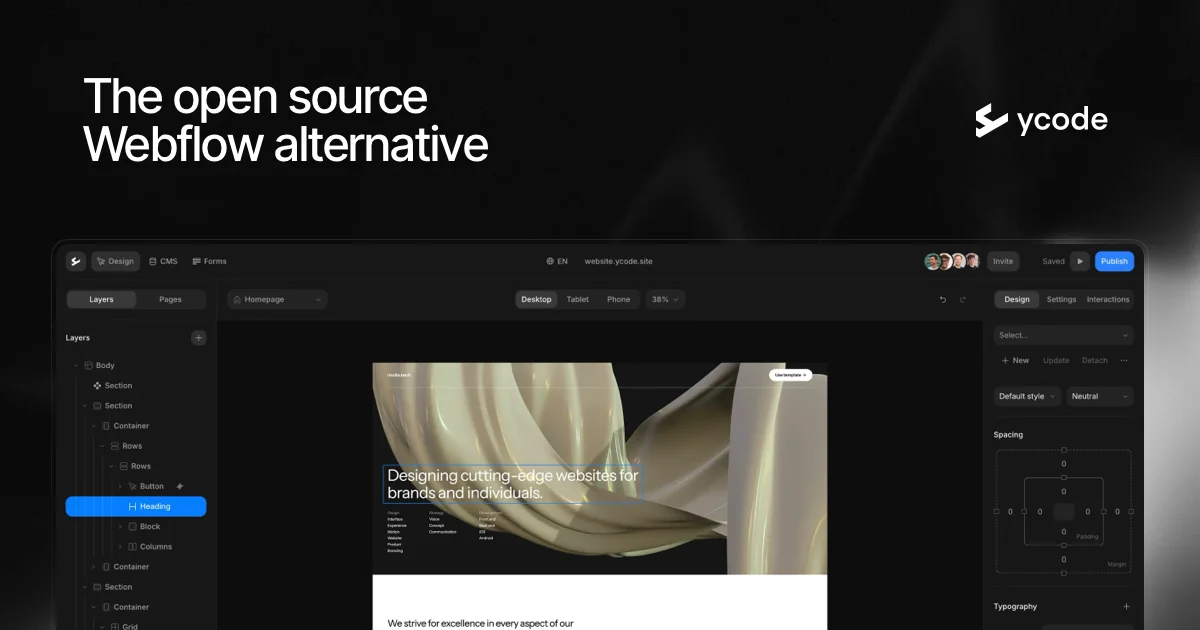
Ycode AI Agents is an open-source visual website builder and CMS that uses conversational AI to handle layout updates, style changes, and structured content management. Built as a Webflow alternative, it prioritizes infrastructure freedom over ecosystem lock-in.
The architecture centers on a visual editor paired with AI agents that interpret natural language commands. You can deploy via Ycode Cloud for managed hosting or self-host on your own infrastructure using their open-source codebase. This hybrid approach addresses a specific engineering problem: visual builders traditionally force a trade-off between ease-of-use and infrastructure control.
I spent three days testing whether the AI agent commands actually deliver on that promise. The conversational CMS features work as described for creating collections and updating structured data. The visual builder handles responsive behavior without requiring manual CSS tweaks per breakpoint.
Setup and Integration Experience
Getting started with Ycode Cloud took me approximately 15 minutes to create an account and access the editor. The interface loads a visual canvas with the AI agent chat panel on the side. I prompted the agent to adjust padding on my hero section and it correctly identified and modified the target elements.
The self-hosting path requires more technical setup. I cloned the GitHub repository and followed the deployment documentation. Docker support exists, which streamlined my local testing environment. However, configuration for production-grade deployments assumes familiarity with server management and environment variable handling.
Auth flows presented a minor friction point. The tool supports OAuth and API key authentication, but the setup wizard buried the API key generation under a settings submenu. Error messages during my testing were adequate but occasionally too generic, especially when content validation failed.
For teams already evaluating AI agent tools for their e-commerce stack, I noticed WorkLLM for building custom agents takes a different approach by focusing purely on agent logic rather than visual site building.
The documentation covers core features thoroughly but glosses over advanced customization scenarios. SDK ergonomics feel modern for the visual builder, though the AI agent API surface could use more granular control options for power users.
Performance and Reliability
Because Ycode offers both cloud-hosted and self-hosted deployments, performance characteristics vary significantly based on your infrastructure choice. In my cloud testing, the visual editor responded quickly for layout changes, with AI command execution typically completing within 2-3 seconds for standard requests.
The self-hosted option on a standard VPS delivered comparable editor responsiveness when I ran it locally. Your mileage depends entirely on server resources and network latency between your hosting provider and your team.
For e-commerce reliability, the critical question is uptime during traffic spikes. Ycode Cloud does not publicly advertise SLA percentages, which raises concerns for high-volume stores that cannot tolerate unexpected downtime. The self-host path gives you control over this, but requires implementing your own monitoring and scaling strategy.
Error handling during my testing handled malformed AI commands gracefully with helpful suggestions. The structured content validation caught invalid data types before publishing, which prevented accidental site breakage.
Pricing and Value
Ycode positions itself as accessible with a free self-hosted tier, which remains rare among visual website builders with AI capabilities. This approach eliminates per-site licensing costs for teams with server infrastructure. The open-source model means you pay only for hosting resources rather than platform premiums.
Ycode Cloud pricing lacks public disclosure, which complicates budget planning for teams evaluating managed hosting options. Based on typical SaaS pricing in this category, expect costs aligned with premium visual builders rather than budget alternatives. The pricing page redirects to a sales inquiry form, suggesting enterprise-focused positioning for cloud deployments.
For self-hosted deployments, ongoing costs include server resources, maintenance engineering time, and monitoring tools. These trade-offs favor teams with existing DevOps capacity over startups seeking minimal operational overhead.
Strengths vs Limitations
| Strengths | Limitations |
|---|---|
| True open-source licensing with full codebase access | No native Shopify Plus integration out of the box |
| Self-hosting eliminates platform dependency | Documentation assumes intermediate technical knowledge |
| Conversational AI for visual layout adjustments | Cloud SLA terms not publicly available |
| Docker support simplifies local development | Limited advanced customization options in agent API |
| Responsive design without manual breakpoint CSS | API key generation buried in settings submenus |
Competitor Comparison
| Feature | Ycode AI Agents | Webflow | Shopify Hydrogen |
|---|---|---|---|
| Open-source option | Yes | No | Yes (via Oxygen) |
| AI conversational CMS | Native | Limited (via integrations) | No (requires third-party) |
| Visual drag-and-drop builder | Yes | Yes | No (code-first) |
| Self-hosting | Full control | No | Yes, but requires Shopify infrastructure |
| Shopify ecosystem native | No | Via third-party embed | Yes, built-in |
| Free tier availability | Self-hosted only | Limited trial | Development stores free |
Use Cases and Best Fit
Ycode AI Agents suits technical teams running marketing sites or content-heavy properties where infrastructure ownership matters more than ecosystem plugins. Agencies managing multiple client sites benefit from the self-hosted model to maintain consistent environments without per-client platform accounts.
The tool underperforms for e-commerce teams requiring deep Shopify synchronization or WordPress plugin compatibility. Enterprise buyers needing guaranteed uptime percentages and dedicated support contracts should negotiate cloud terms directly or evaluate alternatives with established enterprise offerings.
For AI agent experimentation without visual building constraints, WorkLLM offers a complementary approach focused on agent logic rather than visual page composition.
Frequently Asked Questions
Can I migrate an existing Webflow site to Ycode?
Ycode does not advertise automated migration tools. Moving content requires manual export from Webflow followed by content import into Ycode collections. Layout elements must be rebuilt in the visual editor since design formats differ between platforms.
Does self-hosting require a dedicated DevOps team?
Basic Docker deployments work for small-scale testing, but production environments with traffic handling, backups, and security updates benefit from team members comfortable with server administration. The documentation assumes familiarity with environment variables and deployment pipelines.
How does the AI agent handle content that requires editorial approval?
The AI modifies live content directly. Teams requiring review workflows need to implement custom approval processes or use draft/publish states manually. No built-in editorial gate exists for AI-generated changes.
What happens to my site if Ycode discontinues cloud hosting?
The open-source license ensures you retain full codebase access. A discontinuation would affect cloud users requiring migration to self-hosted deployments. Having the codebase means you maintain functionality independently of Ycode's business continuity.
Verdict
Ycode AI Agents delivers genuine infrastructure freedom for teams prioritizing deployment control over ecosystem integrations. The conversational AI assists visual editing without sacrificing the self-hosting advantage that enterprise teams increasingly demand. However, the tool requires technical resources to operate reliably at scale, and the lack of native e-commerce platform connections limits its applicability for Shopify-centric merchants.
For visual website building with full infrastructure ownership, Ycode earns consideration. For teams embedded in the Shopify ecosystem or requiring enterprise SLA guarantees, alternatives present fewer operational trade-offs.
3.5 out of 5 stars
Try Ycode AI Agents Yourself
The best way to evaluate any tool is to use it. Ycode AI Agents offers a free tier — no credit card required.
Get Started with Ycode AI Agents →