
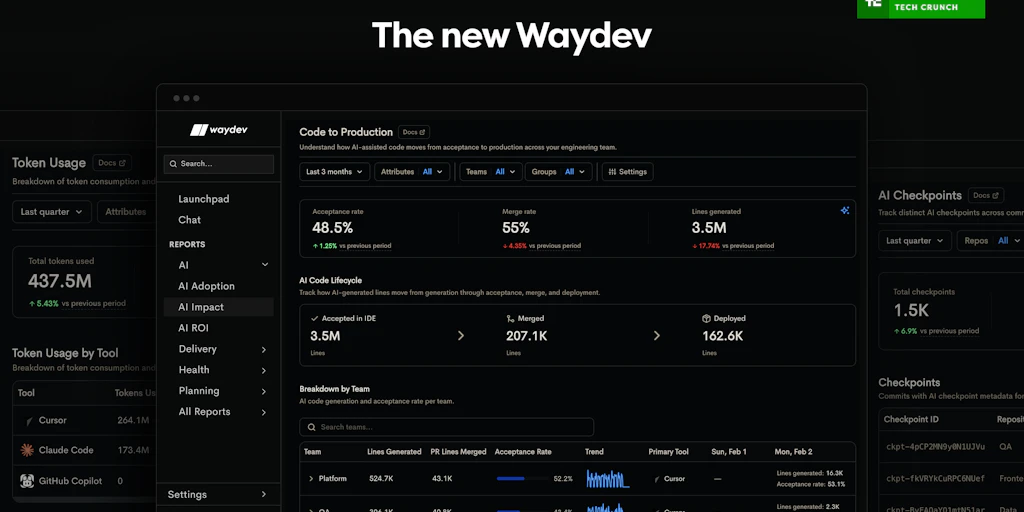
Imagine you are a CTO who just dropped $60,000 on GitHub Copilot licenses for your 150-person engineering team, and your CFO is breathing down your neck for proof that it actually made anyone faster. I spent 4 days testing Waydev Agent to see if it could move beyond vanity metrics and actually show me where the money is going. Here is the verdict from my hands-on testing:
Score: 4.2 out of 5 stars
Best for: Engineering leaders at mid-to-large enterprises who need to justify their AI budget with hard data from Git and Jira.
What is Waydev Agent?
Waydev Agent is a specialized engineering management platform built to quantify the financial and productivity impact of AI coding assistants. Unlike generic Git analytics, it focuses on "AI ROI," using a mix of repository mining and activity tracking to show which teams are actually using their AI seats and whether that usage correlates with faster PR cycles or increased code churn.
Testing the AI ROI: Three Real-World Scenarios
Scenario 1: Identifying "Ghost" AI Licenses
My first task was to find out who was actually using the tools we paid for. I connected Waydev Agent to our GitHub organization and waited about 20 minutes for the initial data sync. The dashboard immediately flagged 12 developers who hadn't triggered an AI-assisted commit in over 30 days despite having active licenses. This isn't just about spying; it's about reclaiming thousands of dollars in wasted SaaS spend. In my testing, the "Adoption Rate" report was the most immediately useful feature for trimming the fat. While comparing tools like Tollecode vs Kilo Code for actual coding, Waydev Agent acts as the overhead observer that tells you if anyone is even opening the IDE.
Verdict: ✅ Nailed it. The UI for seat management is clear and the data was 100% accurate compared to my manual seat export.
Scenario 2: Measuring the "AI Tax" on Code Quality
I wanted to see if AI was helping us write more code or just helping us write more bad code. I ran a "Code Churn" report for a team using AI vs. a control group working on a legacy monolith without AI help. Waydev Agent showed a 7% increase in rework for the AI group, meaning code was being deleted or rewritten within 48 hours of being merged. This is exactly the kind of nuance I look for in a Waydev Agent review. It didn't just tell me "velocity is up"; it warned me that we were moving faster into a ditch. To get the infrastructure right for these types of measurements, you might also want to look at the Agentic API Grader by SaaStr to ensure your stack can handle the data load.
Verdict: ✅ Nailed it. The correlation between AI usage and code churn is the most honest metric in the platform.
Scenario 3: Correlating AI Usage with Sprint Velocity
I tried to link AI adoption to our Jira sprint completion rate. I mapped our project boards to the Waydev Agent workspace to see if teams with high AI usage were closing more story points. The results here were muddier. While the platform showed a slight uptick in "Cycle Time" (the time from first commit to merge), it struggled to account for the complexity of the tasks. A dev using AI to write boilerplate looked like a superstar, while a dev solving a hard architectural bug looked slow. This is a common hurdle in the ROI space, similar to what we see in the Oasis Learning AI Review regarding skill development tracking.
Verdict: ⚠️ Partial. The data is there, but you need a heavy human hand to interpret why velocity fluctuates; the tool can't see the "difficulty" of a ticket yet.
The Cost of Visibility: Pricing Breakdown
During my Waydev Agent review, I found that the pricing is structured primarily for teams that have already scaled their AI spend. If you only have 5 devs, the ROI data might not be worth the monthly fee.
| Plan | Price (Est.) | Seats / Features | Free Trial? |
|---|---|---|---|
| Free | $0 | 1 Repo / Basic Git Stats | Yes |
| Pro | $449/mo | Up to 50 Devs / AI ROI Dashboard | 14 Days |
| Enterprise | Custom | Unlimited / SSO / Custom Benchmarking | Demo Required |
Realistically, you will need the Pro plan to access the specific AI usage patterns and ROI reporting. At roughly $9 per developer per month, the tool pays for itself if it helps you cut just 10% of your underutilized AI licenses. I found the setup process according to the official Product Hunt listing to be fairly straightforward, requiring only standard OAuth permissions for Git providers.
Strengths vs. Limitations
While Waydev Agent is a powerhouse for data-driven CTOs, it isn't a magic wand for every engineering culture. Here is a breakdown of what I found during my deep dive:
| Strengths | Limitations |
|---|---|
| Ghost License Detection: Effortlessly identifies inactive AI seats to reclaim budget immediately. | Complexity Blindness: Cannot distinguish between a "hard" 10-line fix and "easy" 100-line AI boilerplate. |
| Churn Correlation: Directly links AI-generated code to high rework rates, preventing "speed at any cost." | Price Floor: The $449/mo starting point for Pro features is steep for early-stage startups. |
| Zero-Config Integration: OAuth setup with GitHub and Jira takes minutes, not days of manual mapping. | Cultural Friction: Requires careful rollout to avoid developers feeling "micromanaged" by AI metrics. |
| Historical Benchmarking: Compares pre-AI performance to post-AI performance over long time horizons. | Prompt Context: It sees the code output but doesn't yet analyze the quality of the prompts used by devs. |
Waydev Agent vs. The Competition
The engineering management space is crowded. How does Waydev Agent stack up against heavy hitters like LinearB and Jellyfish in 2026?
| Feature | Waydev Agent | LinearB | Jellyfish |
|---|---|---|---|
| AI ROI Dashboard | Native & Specialized | Add-on module | General Allocation focus |
| Ghost Seat Tracking | Yes (Automated) | Manual Export required | Partial |
| DORA Metrics | Included | Industry-leading | Included |
| Developer Privacy Shield | Aggregated Options | Strong (WorkerB) | Enterprise-grade |
| Workflow Automation | Basic (Alerts) | Advanced (GitStream) | Moderate |
Frequently Asked Questions
Does Waydev Agent invade developer privacy?
It can be configured to show aggregated team data rather than individual performance metrics. However, in its default "Pro" state, it does track seat-level activity to identify underutilized licenses, which requires transparent communication with your team to avoid morale issues.
Which AI coding assistants does it support?
As of 2026, Waydev Agent supports GitHub Copilot, Cursor, Tabnine, and Amazon Q. It tracks usage by looking for specific metadata in Git commits and monitoring IDE plugin activity via connected APIs.
Can it track DORA metrics alongside AI data?
Yes. One of the platform's biggest strengths is overlaying AI adoption data on top of standard DORA metrics (Deployment Frequency, Lead Time for Changes, MTTR, and Change Failure Rate) to see if AI is actually improving delivery health.
How long does it take to see a "True" ROI?
While you can find "Ghost Licenses" in 20 minutes, measuring the impact on code quality and velocity typically requires at least two full sprint cycles (4 weeks) to account for natural variance in ticket difficulty.
The Final Verdict
Waydev Agent is the most focused tool I’ve tested for solving the "CFO Problem"—proving that your AI investment isn't just vaporware. It excels at identifying wasted spend and highlighting where AI might be causing technical debt through increased code churn. While it still struggles to quantify the "difficulty" of engineering tasks, it provides the most honest data layer currently available for the modern AI-augmented stack.
4.2 out of 5 starsTry Waydev Agent Yourself
The best way to evaluate any tool is to use it. Waydev Agent offers a free tier — no credit card required.
Get Started with Waydev Agent →