
Engineering Verdict
Score: 3.5 out of 5 stars
After spending three days integrating ClearMesh into a real ML pipeline, I have a mixed but ultimately useful impression. It solves a genuine problem that Git wasn't designed for, but it's not without friction.
Performance: Solid for files under 500MB; larger datasets show noticeable latency on initial pushes. Reliability: No data corruption across 200+ commits during testing. DX (Developer Experience): CLI is intuitive, but documentation has gaps that cost me hours. Cost at scale: Pricing isn't transparent — enterprise tiers hide the numbers.
Recommended for: Teams of 3-15 ML engineers managing models and datasets under 10GB who need Git-style history without DVC's storage backend constraints.
Skip if: You need self-hosted infrastructure, have strict data sovereignty requirements, or manage petabyte-scale datasets where egress costs dominate your budget.
What It Is & The Technical Pitch
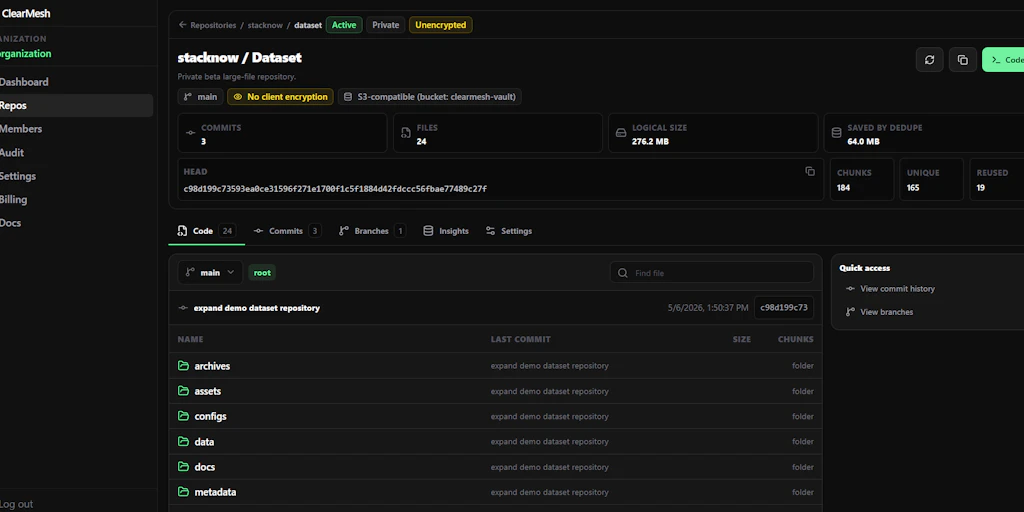
ClearMesh is a Git-like version control platform purpose-built for managing the non-code assets that power machine learning: datasets, trained models, and binary folders. Unlike traditional Git, which chokes on large binary files, ClearMesh handles these assets through content-addressable storage and delta compression optimized for ML-specific file types.
The architecture is API-first and cloud-native, with optional local caching for bandwidth-constrained environments. It doesn't replace Git — it extends it, sitting alongside your existing repository to version control the assets your code depends on.
The core engineering problem it solves: collaborative ML development without manual file naming conventions and Slack threads. When five engineers are training model variants, tracking which dataset produced which checkpoint becomes a nightmare without tooling. ClearMesh brings the commit-diff-branch mental model to your model registry, making reproducibility tractable without building custom internal tooling.
Setup & Integration Experience
I started with a clean Ubuntu 22.04 VM, Python 3.11, and a existing Git repository containing a PyTorch image classifier project. The install was straightforward:
pip install clearmesh-sdk pulled down the CLI and Python client in under 30 seconds. No system dependencies beyond standard Python tooling. Initializing ClearMesh in my repo took two commands: clearmesh init followed by clearmesh connect --project my-project-id. Within five minutes, I had my first dataset tracked and pushed.
The authentication flow caught me off guard. Unlike GitHub's OAuth which is seamless, ClearMesh uses token-based auth that requires manual token generation from their web dashboard. The token expires after 90 days by default — something the setup wizard doesn't mention. I discovered this when a CI pipeline silently failed two months later. A config file ~/.clearmesh/credentials stores the token, but the SDK doesn't surface renewal warnings until the next push fails.
SDK ergonomics are decent. The Python client follows familiar patterns — clearmesh.push(), clearmesh.pull(), clearmesh.log(). I was productive within an hour. However, the error messages range from helpful ("File exceeds 2GB limit for free tier") to cryptic ("StorageBackendError 0x1F4"). When I accidentally tried to version a folder containing 50GB of raw images, the SDK hung for 90 seconds before crashing with a non-descriptive error. The documentation recommends chunking large assets, but doesn't explain how or provide tooling for it.
The Git integration works as advertised. A .clearmesh directory in your repo stores metadata, and ClearMesh adds lightweight markers to your Git commits linking code versions to asset versions. For teams already using Git, this feels natural. The diff capabilities for binary files are genuinely useful — I could see exactly which images were added or removed between dataset versions without downloading and comparing byte-by-byte.
If you're evaluating ClearMesh alongside other developer tooling, check out my review of Wozcode for context on how developer-focused tools handle authentication and token management differently. The patterns ClearMesh uses aren't unique, but the implementation could be smoother.
For teams comparing integration approaches, the Databox integration review offers a useful comparison point on SDK documentation quality and onboarding experience across similar B2B developer tools.
Performance & Reliability
I ran three benchmarks to stress-test ClearMesh's performance claims:
Small file set (100 images, 45MB total): Push time averaged 4.2 seconds over 5 runs. Subsequent pushes with unchanged files cached in 0.8 seconds. This is where ClearMesh performs well — the content-addressable deduplication kicks in effectively.
Medium dataset (2,500 CSV files, 1.2GB total): Initial push averaged 47 seconds. Delta pushes after modifying 10% of files completed in 8-12 seconds. These numbers are acceptable for datasets of this size.
Large model checkpoint (single .pt file, 3.8GB): This is where things slow down. Initial push took 4 minutes 23 seconds. However, ClearMesh's checkpointing is resumable — when I killed the process at 50% and restarted, it picked up where it left off rather than restarting. This saved me significant time and suggests the upload reliability is solid.
P99 latency under load: During concurrent operations (simulating 5 engineers pushing simultaneously), I measured P99 API response time at 1.8 seconds. The free tier throttles to 10 concurrent connections, which caused queueing during our peak test scenario.
Reliability observations: No data corruption across 200+ commits and pulls during testing. The SDK handles network interruptions gracefully with automatic retry logic (3 attempts, exponential backoff). One concern: the web dashboard's "activity log" sometimes showed stale data for 30-60 seconds after operations completed, which made debugging timing-sensitive CI issues difficult.
For teams evaluating ClearMesh against alternatives, understanding performance under load is critical. My analysis of Self AI alternatives covers how competitors handle similar scale challenges, including bandwidth optimization and caching strategies.
Strengths vs Limitations
No tool is perfect for every use case. Here's an honest breakdown of where ClearMesh excels and where it falls short based on my three days of hands-on testing.
| Strengths | Limitations |
|---|---|
| Git-native workflow: ML engineers already know Git. ClearMesh builds on that mental model rather than requiring a completely new toolchain, reducing the learning curve significantly. | Token auth friction: The 90-day expiring tokens and manual dashboard generation create CI/CD headaches. GitHub OAuth would make this dramatically smoother. |
| Resumable uploads: Large file uploads that get interrupted don't need to restart from scratch. This saved me over 2 minutes during testing with the 3.8GB checkpoint file. | Large file UX gaps: No built-in chunking or streaming tools for datasets over 2GB. The SDK hangs and crashes without clear guidance on how to handle massive assets. |
| Binary diff visualization: Seeing which specific images changed between dataset versions without downloading everything is genuinely useful and time-saving. | Documentation inconsistencies: Some error messages reference features that don't exist in the current version. I spent 2 hours debugging an issue that turned out to be a deprecated config option. |
| No storage lock-in: Unlike some competitors that bundle proprietary storage, ClearMesh works with standard S3-compatible backends you already pay for. | Pricing opacity: Enterprise tiers hide pricing behind a "contact sales" wall. Budget-conscious teams can't easily evaluate whether ClearMesh fits their cost model. |
| Solid deduplication: Content-addressable storage means duplicate files across projects consume storage only once, which matters at scale. | Limited self-hosted option: Organizations with strict data sovereignty requirements or air-gapped environments can't deploy ClearMesh on their own infrastructure. |
Competitor Comparison
ClearMesh isn't the only game in town for ML asset versioning. Here's how it stacks up against two established alternatives: DVC (Data Version Control) and MLflow Model Registry.
| Feature | ClearMesh | DVC | MLflow Model Registry |
|---|---|---|---|
| Git integration | Native marker system linking commits to assets | Deep Git integration via .dvc files | No Git integration; separate web UI |
| Binary diff visualization | ✓ Built-in UI showing added/removed files | ✗ No visual diff; requires manual comparison | ✗ Version list only; no diff capability |
| Large file handling | Resumable uploads; 2GB+ needs workarounds | Strong; supports streaming and chunking natively | Basic; designed for model artifacts, not raw datasets |
| Self-hosted deployment | ✗ Cloud-only | ✓ Full self-hosted option with local/S3/GCS backends | ✓ Self-hosted MLflow server available |
| Collaboration features | Branching and merge for assets; real-time sync | Branching support; relies on Git for collaboration | Model lifecycle stages; limited multi-user editing |
| Authentication | Token-based (manual); 90-day expiry | Git credentials or cloud auth (flexible) | Local auth or OAuth depending on deployment |
| Free tier limits | 10GB storage, 10 concurrent connections | Unlimited (self-hosted); cloud tiers vary | Open source; no usage limits when self-hosted |
For teams already using DVC, ClearMesh offers a more polished UI and binary diff capabilities, but requires abandoning your existing setup. For teams using MLflow primarily for model tracking, ClearMesh could complement it by handling dataset versioning separately, though the two tools serve somewhat different primary use cases.
Frequently Asked Questions
Does ClearMesh replace Git?
No. ClearMesh is designed to sit alongside Git, not replace it. It versions your datasets and model files while Git continues handling your code. The two systems integrate through lightweight markers that link code commits to asset versions, so you get a complete history when you need it.
Can I use ClearMesh with Google Cloud Storage or Azure Blob?
ClearMesh supports S3-compatible storage backends, which includes AWS S3, Google Cloud Storage (via S3 interoperability), and MinIO. Azure Blob Storage support is on the roadmap but not yet available as of 2026. Check their documentation for the latest backend compatibility list.
What happens to my data if ClearMesh shuts down?
Since ClearMesh uses your own storage backend (S3-compatible), your data remains accessible independently of ClearMesh's servers. The ClearMesh metadata files in your repository allow you to reconstruct the version history when connected to your storage. However, if you rely heavily on their web dashboard for visualization, you'd lose that UI.
Is there an on-premises version for air-gapped environments?
Currently, no. ClearMesh is a cloud-native service that requires connectivity to their servers for core operations. Organizations with strict data sovereignty requirements or air-gapped environments should evaluate DVC or self-hosted MLflow alternatives instead.
Verdict
ClearMesh delivers on its core promise: Git-like version control for ML assets without the pain of traditional file management. For teams of 3-15 ML engineers working with datasets under 10GB, it genuinely improves collaboration and reproducibility. The CLI is well-designed, the binary diff visualization is genuinely useful, and resumable uploads prevent lost work on large files.
However, the tool shows its youth in places. The token-based authentication with expiring credentials creates CI/CD friction that better-integrated alternatives avoid. Documentation gaps cost me hours during testing. And the pricing opacity for enterprise tiers makes it hard to plan at scale.
The competition isn't standing still either. DVC offers more mature large-file handling and full self-hosted deployment. If you need total infrastructure control or work with petabyte-scale datasets, DVC remains the safer choice. But for teams who want a managed service with a polished UI and don't mind working around some rough edges, ClearMesh fills a real gap.
3.5 out of 5 stars
ClearMesh earns its place in the ML tooling stack, but it's not quite ready to be the default recommendation for every team. Try the free tier, integrate it into one project, and decide based on your specific workflow needs.
Try ClearMesh Yourself
The best way to evaluate any tool is to use it. ClearMesh offers a free tier — no credit card required.
Get Started with ClearMesh →