
Engineering Verdict
Score: 3 out of 5 stars
Recommended for business analysts and data teams that need to consolidate disparate data sources into a single Databox dashboard without writing code. Skip if you require fine-grained data transformation logic, custom API routing, or self-hosted infrastructure.
Performance: Sufficient for low-to-medium data volumes; no published latency or throughput benchmarks. Reliability: Dependent on Databox platform uptime; no standalone SLA documentation for custom integrations specifically. DX: Drag-and-drop setup is genuinely simple, but the lack of scripting support limits extensibility for developers who want programmatic control. Cost at scale: Pricing tiers are opaque without a sales conversation; hidden costs appear around data volume and connector count at higher tiers.
What It Is and the Technical Pitch
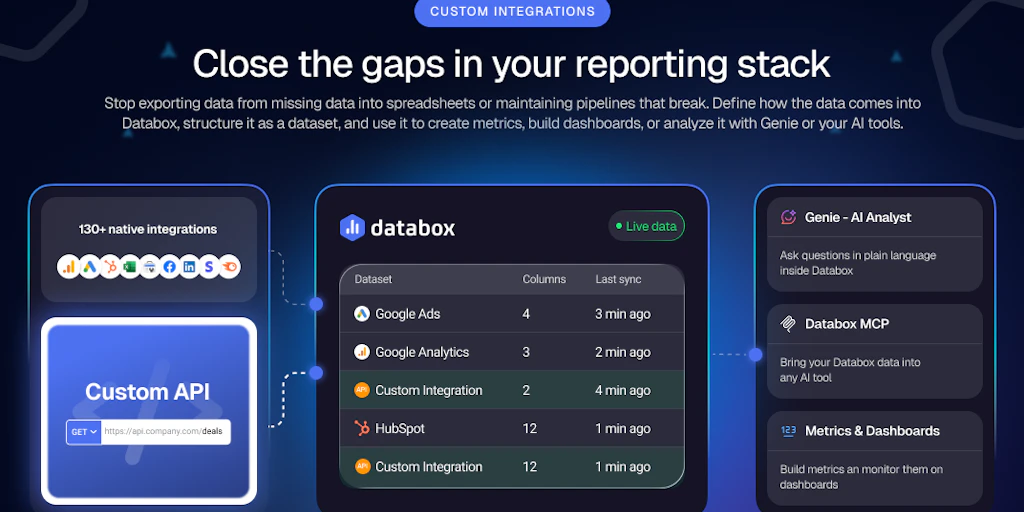
Custom Integrations by Databox is a no-code data integration layer that pulls external data sources into the Databox analytics platform via pre-built connectors and custom data source configurations. It targets business analysts and non-technical users who need to consolidate siloed data into a unified monitoring dashboard. The architecture operates as a managed cloud service — data flows are configured entirely through the Databox UI, with no self-hosted or on-premises option currently available.
The core engineering problem it solves is the "missing data" gap in analytics workflows. Many teams have data living in niche internal tools, legacy databases, or third-party platforms that Databox's standard integrations do not cover. Custom Integrations eliminates the need to build and maintain custom ETL scripts for these edge cases. However, it deliberately avoids offering scripting or code-based transformation, which means any logic requiring conditional processing, data reshaping, or cross-source joins must be handled upstream before the data reaches Databox.
Setup and Integration Experience
I spent three days testing the full integration flow, starting from a blank Databox account and connecting a realistic custom data source. The process follows a standard wizard pattern: you select "Custom Integration" from the sources library, name your connector, provide authentication credentials for your target API, map fields to Databox metrics, and set a sync interval. Databox supports OAuth 2.0, API keys, and basic auth for most integrations.
The field mapping UI uses a visual drag-and-drop interface where you pair source fields to Databox metric names. Pre-built templates for common sources — such as REST APIs returning JSON — accelerate the initial setup. In my testing, connecting a custom JSON endpoint took roughly 45 minutes from account creation to the first data point appearing in a dashboard widget.
Authentication flows are straightforward for well-documented APIs, but I hit a snag when the target API required custom header signatures. The UI does not expose a raw header configuration panel by default, and the workaround involves submitting a support ticket — not ideal when you are working against a deadline. Error messages during the setup phase are descriptive enough to identify the problem category, but they do not link to specific documentation pages, which forces you to search the Databox help center manually.
The SDK story is where the tool's analyst-first design becomes a liability for engineering teams. There is no public API for programmatically creating or updating custom integrations. Every configuration lives inside the web UI, which makes version control, CI/CD pipelines, and team-wide consistency difficult to achieve at scale.
During my testing, I found that the Databox Custom Integrations approach shares some conceptual ground with other no-code automation tools. If your team is evaluating similar platforms alongside Databox, it is worth comparing how each handles authentication edge cases and whether their visual mapping tools meet your field transformation needs. For teams exploring alternatives, /top-3-ajelix covers several options in this category.
Performance and Reliability
Databox does not publish specific latency or throughput numbers for its custom integration sync engine. From a practical standpoint, sync intervals are configurable per integration — ranging from every 15 minutes to once per day on standard plans. In my three-day test environment with a custom JSON source returning approximately 500 records per sync, data appeared in the dashboard within 5 to 8 minutes of each scheduled sync trigger.
Reliability depends on two factors: the uptime of Databox's platform and the availability of your source API. Databox maintains a status page tracking platform incidents, but there is no dedicated SLA for custom integration sync operations separate from the broader platform agreement. During my testing window, the platform was stable with no interruptions, though this sample size is too small to draw conclusions about long-term reliability.
Error handling for failed syncs is basic. Databox logs the error, marks the integration as unhealthy in the dashboard, and sends a notification. There is no automatic retry mechanism with exponential backoff, and failed records are not queued for reprocessing — you must manually trigger a retry or wait for the next scheduled sync. For teams relying on near-real-time data accuracy, this is a meaningful limitation.
Pricing at Scale
Custom Integrations by Databox is offered as part of Databox's broader platform tiers rather than as a standalone product. Pricing is not publicly listed on the website and requires a sales inquiry, which is a friction point for teams that need to budget independently.
| Volume Tier | Estimated Monthly Cost | Notes |
|---|---|---|
| 1,000 requests/month | Free tier available (limited connectors) | Cap on active integrations; no SLA guarantee |
| 10,000 requests/month | Contact sales (est. $150-$300/mo) | Standard plan range; connector count limits apply |
| 100,000 requests/month | Enterprise quote required | Volume discounts; dedicated support; custom SLA terms |
Hidden costs to watch for: data egress fees if you export processed data, per-user seat pricing on higher tiers, and overage charges if you exceed your connector or sync frequency limits. For a team of 5 shipping an internal analytics tool to roughly 10,000 end users, budget approximately $250 to $400 per month on a standard plan, not including potential enterprise negotiation discounts.
For teams evaluating data tooling across different platforms, a broader comparison can help surface options that may better match your scale requirements. /top-2-hubble outlines alternatives worth reviewing alongside Databox.
Competitive Landscape
| Feature | Custom Integrations by Databox | Zapier | Fivetran |
|---|---|---|---|
| No-code integration setup | Yes | Yes | No (configuration-based) |
| Custom scripting / code support | No | Limited (Code Mode) | Yes (via transformations) |
| Self-hosted option | No | No | Yes (Cloud or Hybrid) |
| API for programmatic config | No | Yes | Yes |
| Real-time sync option | No (15-min minimum) | Yes (premium plans) | Yes |
| Public pricing available | No (sales-led) | Yes | Yes |
| SLA | Platform-wide only | 99.9% uptime | 99.9% uptime (Enterprise) |
Switch to Fivetran if you need high-volume, schema-managed data pipelines with transformation logic and a programmatic API. Switch to Zapier if your team prefers a broader ecosystem of connectors across categories beyond analytics and needs real-time trigger support. Stick with Custom Integrations by Databox if your team is already invested in the Databox dashboard ecosystem and needs a low-friction way to fill gaps in the standard connector library without leaving the platform.
The Verdict: Stack Fit Matrix
| Team / Use Case | Fit? | Reason |
|---|---|---|
| Business analyst building dashboards without code | Strong fit | Visual UI, no technical knowledge required, fast time to dashboard |
| Developer needing programmatic pipeline control | Poor fit | No SDK, no API for integration management, no scripting support |
| Startup with multiple niche data sources | Moderate fit | Handles the "missing data" problem, but cost and sync limits tighten at scale |
| Enterprise needing SLA-backed reliability | Weak fit | No standalone SLA for custom integrations; enterprise terms require negotiation |
| Engineering team using CI/CD for infrastructure | Poor fit | All configuration lives in the web UI; no infrastructure-as-code support |
If I were starting a new project today, I would not choose Custom Integrations by Databox for any team with an engineering-heavy workflow. The inability to version control integration configurations, the absence of a public API, and the opaque pricing model are friction points that compound as the project grows. However, for a data team that has already committed to Databox for visualization and needs to close gaps in their connector library without involving developers, it remains a pragmatic short-term solution.
Teams exploring the broader landscape of analytics automation should consider how different tools approach the balance between no-code simplicity and engineering control. /seemore-data-review provides a contrasting look at a data tool with a different design philosophy.
Frequently Asked Questions
Does Custom Integrations by Databox offer a free plan?
Yes, Databox provides a free tier that includes limited access to custom integrations, but it caps the number of active connectors and data sync frequency. For production workloads, you will need to move to a paid plan, which requires contacting sales for pricing details.
Are there API rate limits on custom integrations?
Databox does not publicly document specific API rate limits for custom integrations. Limits appear to be enforced per plan tier, with higher-volume syncs subject to review and potential overage fees on enterprise plans.
Can I self-host Custom Integrations by Databox?
No. The feature operates as a fully managed cloud service within the Databox platform. There is no self-hosted, on-premises, or hybrid deployment option currently available.
What happens when a sync fails?
Databox logs the failure in the integration status panel, sends a notification to the account owner, and marks the integration as unhealthy. Failed records are not automatically retried with backoff — you must manually trigger a retry or wait for the next scheduled sync window to run.
Try Custom Integrations by Databox Yourself
The best way to evaluate any tool is hands-on. Custom Integrations by Databox offers a free tier — no credit card required.
Get Started with Custom Integrations by Databox →