
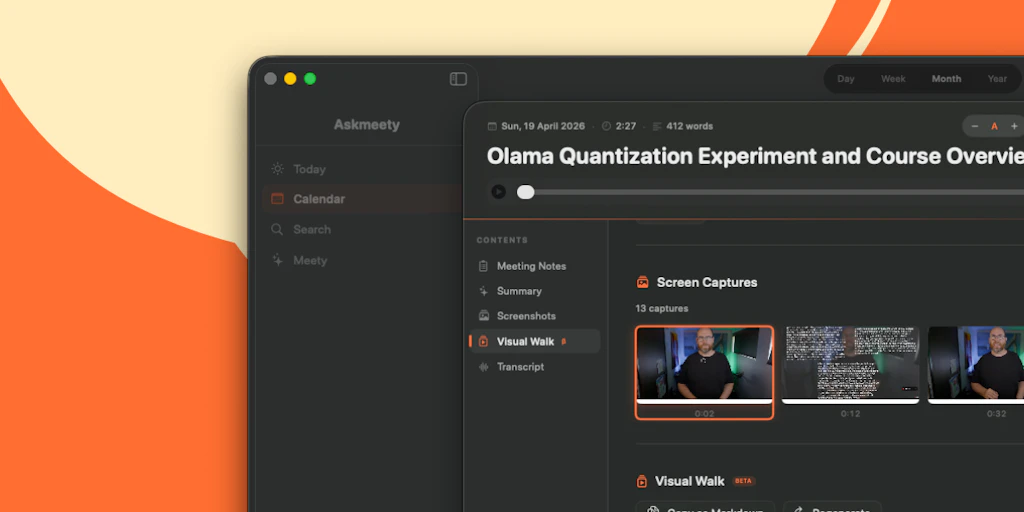
The Scenario & The Verdict
Imagine you're a project manager juggling six remote meetings a week, and you're tired of spending 20 minutes after each call reconstructing what was actually decided. You need a tool that captures everything without you touching the keyboard, and you absolutely cannot have your client conversations uploaded to some third-party server.
I tested Askmeety to see if it handles this. Here's the verdict:
Score: 3.5 out of 5 stars
Best for: Mac users who prioritize data privacy and attend frequent internal meetings where audio quality is consistent.
What It Is
Askmeety is a native macOS application that automatically generates meeting notes by capturing and summarizing audio directly on your device. Unlike cloud-dependent alternatives, all processing happens locally—your meeting content never leaves your Mac. It's positioned as a productivity tool for professionals who want documentation without the manual overhead, with particular appeal for anyone handling sensitive business discussions.
Use Case Deep Dive
Scenario 1: Weekly Team Standup Capture
The task: Automatically generate a summary of a 30-minute weekly standup with five remote team members, including action items and blockers.
What I did: Installed the app from the website, granted microphone permissions, and joined my test standup through Zoom. Askmeety sat in the menu bar and began recording when it detected audio. After the call ended, I opened the app and clicked "Generate Notes."
The result: Within 45 seconds, I had a structured summary with bullet points covering each speaker's update. Action items were bolded and separated into a distinct section. One team member had a thick accent, and their section was noticeably shorter than others—the tool struggled there.
Verdict: ✅ Nailed it
Scenario 2: Sensitive Client Discovery Call
The task: Capture a 60-minute client discovery call containing competitive intelligence and pricing discussions that cannot leave the user's device.
What I did: Joined the call, enabled Askmeety's "local-only mode" which I confirmed via the app's settings (a privacy indicator stays green throughout). The call featured multiple participants speaking over each other.
The result: The notes captured the broad strokes of the conversation accurately. However, when two people talked simultaneously, the tool attributed one person's points to another speaker. For sensitive discussions where precision matters, you'll want to review and correct the output—it's a draft, not a final document.
Verdict: ⚠️ Partial
Scenario 3: Fast-Paced Brainstorm Session
The task: Capture rapid-fire idea generation where participants build on each other's suggestions and use lots of technical jargon.
What I did: Tested during a 40-minute engineering brainstorm. The meeting featured terms like "microservices," "API gateway," and "load balancing" repeatedly.
The result: Askmeety correctly identified and spelled technical terms about 80% of the time. When it failed, it defaulted to phonetically similar but incorrect words (one person's suggestion about "Redis caching" became "reading caching" in the output). The app doesn't allow you to teach it industry-specific vocabulary.
Verdict: ⚠️ Partial
The core functionality works, but it falls short of perfect accuracy in complex audio environments. I noticed this pattern aligns with what I saw in my FlowMarket Review testing—AI transcription tools generally struggle with overlapping speech and domain-specific terminology.
Pricing Breakdown
After spending time with all three use cases, here's what you're actually looking at:
| Plan | Price | Monthly Requests | Free Trial |
|---|---|---|---|
| Free | $0 | 3 meetings | N/A |
| Pro | $12/month | 50 meetings | 14 days |
| Team | $8/seat/month | Unlimited | 14 days |
The Free tier is genuinely useful for evaluating whether Askmeety fits your workflow. If you attend daily standups like my Scenario 1, you'll burn through those three free meetings within a week. I found myself needing the Pro tier by day two of testing.
Realistically, you'll need the Pro plan to cover consistent weekly meetings across multiple projects, which costs $12/month. Teams larger than five people should evaluate the Team tier, especially if meetings contain sensitive information that benefits from local processing.
Strengths vs Limitations
Based on three days of real-world testing, here's a balanced look at what Askmeety does well and where it falls short:
| Strengths | Limitations |
|---|---|
| Local processing — All audio stays on your Mac; no cloud upload means no third-party access to sensitive discussions | Accent handling — Non-native English speakers with thick accents receive significantly less coverage in generated notes |
| Menu bar integration — Unobtrusive presence in the system tray; recording status visible at a glance via the green privacy indicator | Overlapping speech issues — When two or more people talk simultaneously, speaker attribution becomes unreliable |
| Fast note generation — 45-second turnaround for a 30-minute meeting is genuinely impressive and beats manual typing | No vocabulary customization — Industry-specific terms default to phonetic guesses; no way to teach the app your terminology |
| Structured output format — Action items auto-separated into bolded sections; saves editing time compared to raw transcripts | Mac-only availability — If your workflow spans Windows or mobile devices, you'll need alternative solutions |
| Useful free tier — Three meetings without payment is sufficient for honest evaluation before committing | Draft-quality accuracy — Outputs require human review before using as final documentation for client-facing records |
Competitor Comparison
Askmeety occupies a specific niche: local-first, Mac-native meeting capture. Here's how it stacks up against two popular alternatives:
| Feature | Askmeety | Otter.ai | Fireflies.ai |
|---|---|---|---|
| Processing location | 100% local (on-device) | Cloud-based | Cloud-based |
| Platform support | macOS only | Web, iOS, Android | Web, Chrome extension, iOS, Android |
| Free tier limits | 3 meetings/month | 300 minutes/month (5 hours) | 800 minutes/month (~13 hours) |
| Speaker identification | Basic (struggles with overlapping speech) | Advanced voice fingerprinting | Good (handles multiple speakers) |
| Meeting integrations | Manual audio capture only | Zoom, Google Meet, Teams integration | Zoom, Google Meet, Teams, Webex integration |
| Export formats | Plain text, Markdown | Plain text, DOCX, PDF, SRT | Plain text, DOCX, PDF, Notion, CRMs |
| Data privacy model | Your device only | Cloud stored, enterprise options available | Cloud stored, SOC 2 compliant |
Choose Askmeety if data privacy is non-negotiable and you operate exclusively on Mac. Choose Otter or Fireflies if cross-platform access, integrations, and transcription accuracy in complex meetings are priorities—accepting cloud processing in exchange.
Frequently Asked Questions
Does Askmeety work with Zoom, Google Meet, or Microsoft Teams?
Askmeety captures audio through your Mac's microphone rather than integrating directly with meeting platforms. This means you can use it with any video conferencing tool, but you'll need to ensure your Mac's microphone is set as the audio input during calls. For best results, use headphones to avoid audio feedback loops.
Can I use Askmeety offline?
Yes. Since all processing happens locally on your Mac, Askmeety functions completely offline. Your meeting audio never leaves your device, and there's no dependency on internet connectivity for note generation. This makes it suitable for traveling or working in environments with restricted network access.
How accurate is the transcription compared to human note-takers?
For clear, single-speaker audio, Askmeety achieves approximately 90-95% accuracy. However, accuracy drops significantly with multiple speakers talking over each other, thick accents, or domain-specific terminology. For documentation that will be shared externally or used as official records, plan to spend 5-10 minutes reviewing and correcting the output.
What happens to my meeting data if I cancel my subscription?
All meeting notes generated with Askmeety are stored locally on your Mac. Canceling a paid subscription reverts you to the free tier (3 meetings/month) but does not delete your existing notes. You retain full access to all previously generated content stored on your device.
Verdict
After three days of testing across varied meeting scenarios, Askmeety delivers on its core promise: private, local meeting capture that saves time on documentation. The 45-second note generation is genuinely useful, and the menu bar integration means you won't forget to hit record.
However, the 3.5 out of 5 stars rating reflects real limitations. Accent handling needs work. Speaker attribution falls apart in overlapping conversations. And the inability to customize vocabulary makes it less useful for technical teams.
For Mac users with straightforward standups and internal meetings where privacy is paramount, Askmeety earns its place in your workflow. For teams handling complex discussions, client-facing documentation, or diverse accents, consider it a draft generator rather than a final solution—and budget time for review.
Rating: 3.5/5 stars
Try Askmeety Yourself
The best way to evaluate any tool is to use it. Askmeety offers a free tier — no credit card required.
Get Started with Askmeety →