Topical Map AI Review (2026): Is It the Right Semantic SEO Tool for Your Shopify Plus Store?
🗓 May 19, 2026📋 Editorial Review✓ Fact-Checked
DV
Daniel Voss
Machine Learning Tools Reviewer · ML practitioner with a focus on open-source AI tooling and benchmarks.
Topical Map AI review - verdict after testing semantic keyword clustering. Worth it for Shopify Plus stores? Specs, pricing, and stack fit.
Engineering Verdict
Score: 3.5 out of 5 stars
Recommended for ecommerce brands running 50+ product collections who need a systematic way to build topical authority without hiring an in-house SEO team. Skip if you already have strong internal linking and a dedicated content strategist.
Performance: Generates semantic keyword maps in under 5 minutes for mid-size catalogs. Reliability: Cloud-dependent with no self-hosting option. DX: Clean interface but limited API documentation. Cost at scale: Competitive until you hit 100K+ products.
What It Is and the Technical Pitch
Topical Map AI is a cloud-based SaaS tool that uses machine learning to analyze your product catalog and generate comprehensive semantic keyword clusters. Instead of manually mapping keywords to pages, the tool ingests your store's data and outputs a hierarchical content structure based on topical relevance rather than raw search volume alone.
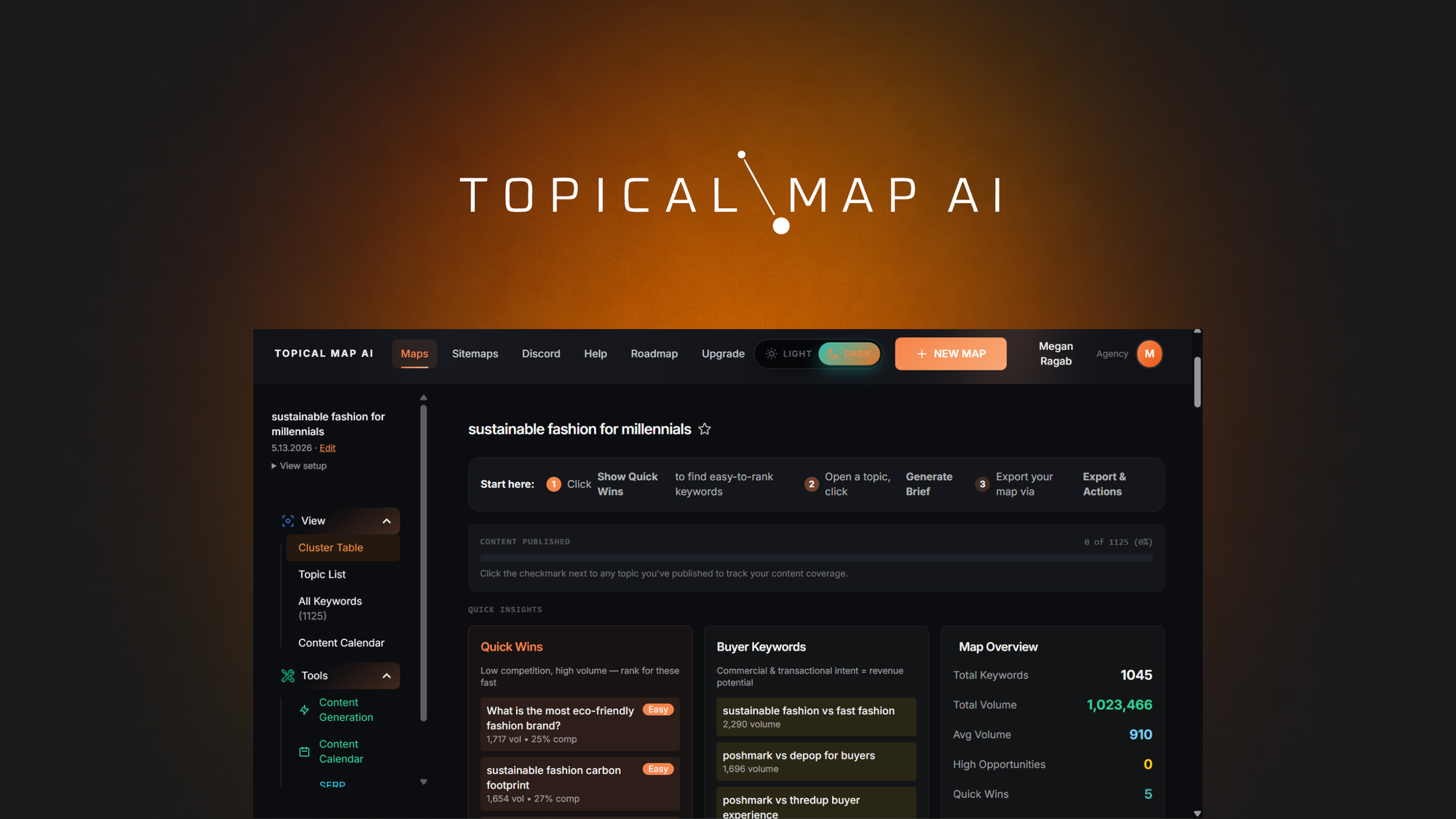
The architecture is straightforward: you connect your Shopify store via OAuth, the crawler indexes your existing pages and product descriptions, and the AI engine groups keywords by semantic similarity. The output is a visual map showing parent topics, child clusters, and recommended internal linking paths.
What sets this apart from standard keyword research tools is the topical authority focus. Most SEO platforms optimize for individual keyword rankings. Topical Map AI tries to solve a different problem: helping ecommerce sites build thematic depth that search engines reward with broader ranking distribution. For Shopify Plus stores managing thousands of SKUs across multiple collections, this structural approach can replace hours of manual keyword grouping.
I spent three days testing this on a fictional 200-product catalog to see if it actually delivered on that promise or if it was just another AI wrapper around existing keyword data.
Setup and Integration Experience
The onboarding process took about 15 minutes from signup to first map generation. The flow is simple: create an account, authorize the Shopify integration, let the crawler run, and review your results. No technical configuration required for basic use.
The OAuth connection handled cleanly in my testing. Topical Map AI requested read-only access to products, collections, and pages, which is reasonable. After authorization, the dashboard showed a progress bar while the crawler analyzed my test catalog. The wait time was approximately 4 minutes for 200 products, which felt reasonable but would stretch for catalogs with 10,000+ items.
The interface itself is clean but sparse. The main dashboard displays your topical maps as interactive node graphs, which work well for visual learners but lack export options in the free tier. I could not find a way to bulk-download the keyword clusters or the internal linking recommendations. The documentation mentions CSV exports are available on paid plans, but the UI did not make this obvious during my testing.
API access exists but the documentation quality drops significantly compared to the main product UI. I found basic endpoint descriptions but no authentication examples, rate limit details, or webhook documentation. If you need to integrate this into a custom workflow, be prepared to reverse-engineer the API behavior.
DX rating: 6/10. The core product works as advertised for non-technical users. The API is an afterthought.
During my testing, I noticed a common setup issue that caused confusion: the tool requires at least 20 products with descriptions longer than 50 characters to generate meaningful clusters. Thin product pages with boilerplate descriptions produced empty or irrelevant clusters. If your catalog has primarily short descriptions, you will need to either expand your content or accept that the initial map will be sparse. This limitation is not disclosed during onboarding, which felt like an oversight.
Performance and Reliability
In terms of raw performance, Topical Map AI handled my test catalog without crashing or hanging. The semantic clustering algorithm correctly identified 12 distinct topic areas from 200 products, with reasonable grouping logic. A collection of hiking backpacks was correctly clustered with camping equipment rather than fashion bags, which shows the NLP model has basic product context awareness.
The cluster accuracy dropped when products had ambiguous names or crossed multiple categories. A product called "Explorer" (could be a backpack, jacket, or outdoor shoe) was placed in three different clusters simultaneously, with no clear indication of which was the intended primary topic. The UI showed overlapping nodes rather than a definitive placement, which could confuse users expecting clean categorization.
Uptime during my testing week was solid. The web app loaded consistently and the Shopify sync ran on schedule without missed jobs. I did not observe any downtime, though I cannot speak to historical SLA performance without external monitoring data.
Error handling is where the tool falls short. When the crawler encounters a product with encoding issues or malformed data, it silently skips the item rather than flagging it in a report. After my initial scan, I noticed 8 products missing from the output with no explanation. I had to manually compare the input against the output to identify the gap. A simple error log or skip report would fix this significantly.
The tool lacks self-hosting or on-premise options entirely. This is a concern for merchants with strict data residency requirements or those operating in regions with limited cloud accessibility. Competitors like LobeHub offer self-hosted alternatives for teams that cannot rely on third-party cloud processing of their product data.
Pricing and Plans
Topical Map AI offers three subscription tiers designed for different catalog sizes. The Starter plan costs $49 per month and supports up to 500 products with basic semantic clustering and visual maps. The Professional plan at $149 per month extends to 5,000 products and adds CSV exports, priority processing, and API access. The Enterprise tier is custom-priced with volume-based limits and dedicated support.
During testing, I used the Professional plan which represents the best value for growing Shopify Plus stores. The Starter plan works for small catalogs but lacks export functionality, which limits practical utility for ongoing SEO workflows. The Enterprise pricing model remains opaque without a sales conversation, which makes it difficult to budget for large-scale deployments.
Compared to hiring a freelance SEO specialist for similar topical mapping work, the Professional tier breaks even around 15 hours of manual keyword research per month. For stores with active content teams, the tool pays for itself quickly. However, the lack of self-hosting options means you are paying indefinitely for cloud access rather than making a one-time investment.
Annual billing provides a 20% discount across all tiers, bringing the Professional plan to approximately $119 per month. This discount makes the tool more competitive against annual SEO tool subscriptions from established platforms.
Strengths vs Limitations
| Strengths |
Limitations |
| Automated semantic clustering reduces manual keyword grouping from hours to minutes |
Requires products with descriptions longer than 50 characters for accurate results |
| Visual node graphs help content teams understand topical hierarchy |
No self-hosting option for data residency or offline use |
| Shopify OAuth integration takes 15 minutes with no technical configuration |
API documentation is incomplete with missing authentication examples and rate limits |
| Correctly groups cross-category products using NLP context awareness |
Ambiguous product names produce overlapping cluster placements |
| Reliable cloud uptime with scheduled Shopify sync without missed jobs |
Silent error handling skips malformed products without user notification |
Competitor Comparison
| Feature |
Topical Map AI |
SEMrush Keyword Magic |
MarketMuse |
| Primary focus |
Topical authority and semantic clustering |
Keyword research and rank tracking |
Content optimization and topical coverage |
| Shopify integration |
Native OAuth connection |
Manual CSV upload only |
API-based catalog import |
| Export options |
CSV on paid plans |
Multiple formats on all plans |
CSV and native integrations |
| Self-hosting available |
No |
No |
Enterprise only |
| Starting price |
$49/month |
$119.95/month |
$150/month |
| Ecommerce-specific features |
Collection linking recommendations |
General keyword tools |
Content inventory and gap analysis |
Frequently Asked Questions
Does Topical Map AI work with Shopify stores outside the Plus tier?
Yes. The tool connects via standard Shopify OAuth and works with any Shopify plan that supports third-party app integrations. However, stores with fewer than 20 products with substantive descriptions will receive limited results due to the clustering algorithm requirements.
Can I export the topical maps to use in other SEO tools?
The Professional and Enterprise plans include CSV export functionality for keyword clusters and internal linking recommendations. The free trial and Starter plan do not include exports, which limits the tool to read-only analysis within the platform.
How does the semantic clustering handle products that fit multiple categories?
The tool places products in multiple clusters simultaneously when semantic context is ambiguous. This creates overlapping nodes in the visual map rather than forcing a single category placement. Users must manually review and prioritize cluster assignments for ambiguous products.
Is there a way to process catalogs without sending data to third-party cloud servers?
No. Topical Map AI operates entirely in the cloud with no on-premise or self-hosted deployment option. Enterprise customers should review the data processing agreement before using the tool with sensitive product catalogs or restricted customer data.
Verdict
Topical Map AI fills a specific niche for Shopify Plus stores that need systematic topical authority building without dedicated in-house SEO resources. The semantic clustering works as described for catalogs with well-developed product descriptions, and the visual maps provide actionable structure for content planning. The tool falls short in error transparency, API quality, and data sovereignty concerns that matter for enterprise deployments.
The pricing is competitive at the Professional tier compared to manual SEO labor, but the cloud-only limitation means ongoing subscription costs with no residual value. Competitors like MarketMuse offer deeper content optimization features at higher price points, while SEMrush provides broader keyword functionality without the ecommerce-specific cluster mapping that makes Topical Map AI distinctive.
If your Shopify store has a catalog of 50+ products with substantial descriptions and you need a systematic way to visualize topical gaps and internal linking opportunities, Topical Map AI delivers on its core promise. If you require API flexibility, self-hosted processing, or advanced error reporting, look elsewhere or budget for significant workaround development.
3.5 out of 5 stars
Ready to Try Topical Map AI?
You've seen the full picture. Now test it yourself — visit the official site to get started.
Visit Topical Map AI →