
The Category Landscape and Where Rescript for Desktop Fits
There are roughly four serious players in transcript-based video editing. Here's how they split:
| Tool | Best For | Price Start | Key Differentiator |
|---|---|---|---|
| Descript | Professional podcasters and teams | $30/month | Cloud AI, collaboration features, stock media |
| Rescript for Desktop | Ecommerce sellers and privacy-focused creators | Free | Fully on-device processing, open source |
| Captions | Social media creators wanting auto-styling | $19/month | AI avatar, automatic caption styling |
| Riverside | Remote interview recording | $15/month | Local recording backup, 4K video quality |
I tested Rescript for Desktop specifically because I wanted to see if a free, open-source tool could actually replace Descript for ecommerce video workflows. After three days editing product demos and TikTok content, I have a clear answer. Score: 4 out of 5 stars. The privacy-first approach is genuinely compelling, but it trades some polish for that freedom.
What Rescript for Desktop Actually Does
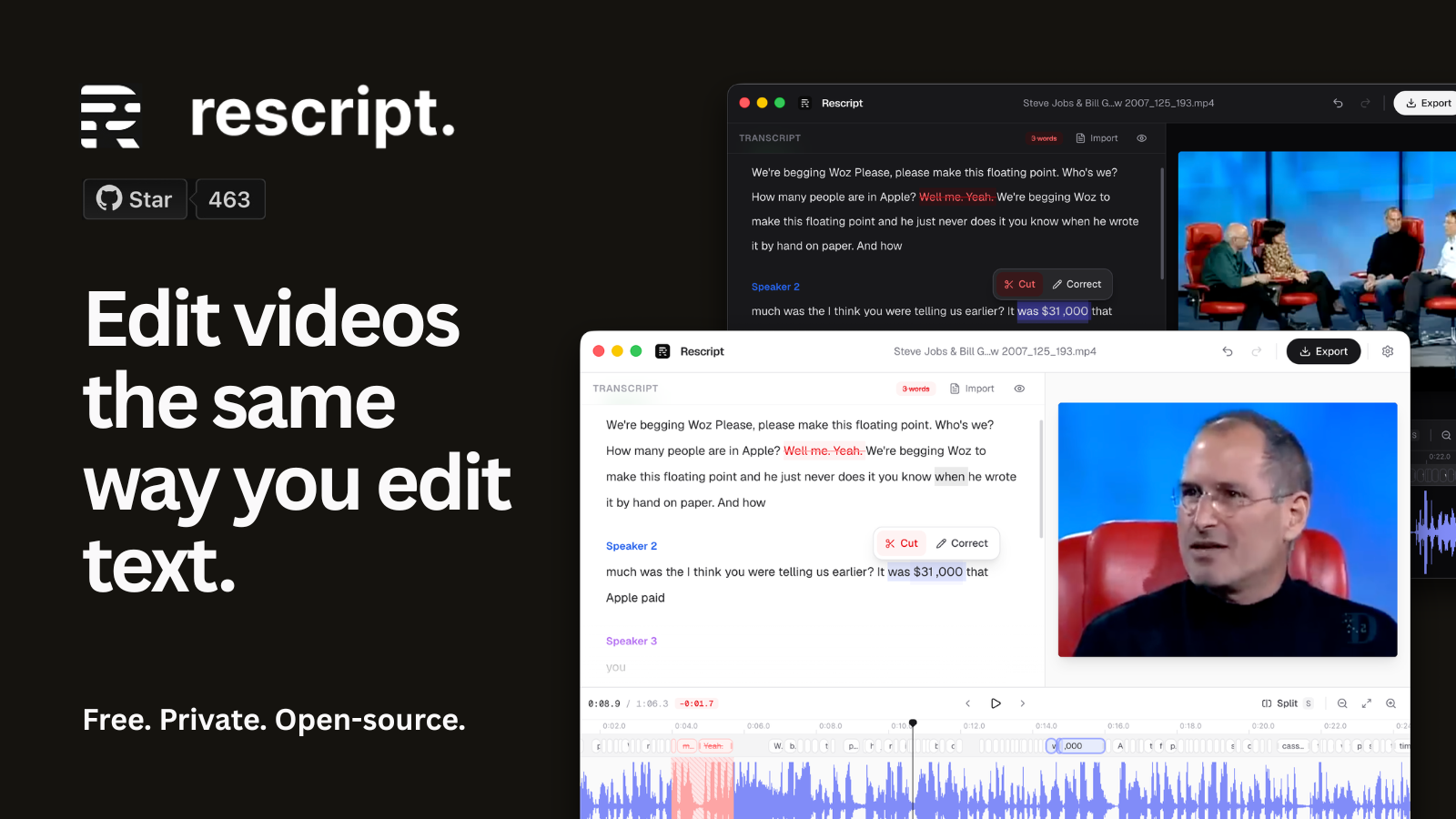
Rescript for Desktop is an open-source, transcript-based video editor that transcribes your footage on-device using Whisper AI, then lets you cut video by deleting text. Instead of scrubbing timelines, you select words and hit delete — the matching footage goes with them. It strips filler words and silences in one click, exports locally via FFmpeg, and never uploads anything. For ecommerce sellers who need quick product demos without uploading raw footage to cloud servers, this fills a real gap.
Head-to-Head Benchmark
Here is how Rescript for Desktop stacks up against its two closest competitors on the features that actually matter for ecommerce video work:
| Feature | Rescript for Desktop | Descript | Captions |
|---|---|---|---|
| Pricing | Free forever | $30/month starter | $19/month creator |
| Processing Location | On-device only | Cloud-based | Cloud-based |
| Word-Level Editing | Yes, via Whisper timestamps | Yes, via AI transcription | Limited to caption sync |
| Filler Word Removal | One-click auto-cleanup | Manual selection | Auto-skip with premium |
| Privacy Model | Zero upload, open source | Data processed on servers | Full cloud dependency |
| Export Options | Video, audio, subtitles, SRT | Video, audio, podcast, Captions | Auto-captioned social clips |
| Speaker Detection | Automatic labels | Automatic labels | Limited |
| OS Support | macOS, Windows, Linux | macOS, Windows, Web | Web, iOS, Android |
The core advantage is stark: Rescript for Desktop does not require an internet connection after installation. Your product footage never touches a server. For sellers who have hesitated at uploading unreleased products to cloud services, this removes a major friction point entirely.
My Rescript for Desktop Hands-On Test
I spent three days editing a mix of product unboxing footage, short-form demo videos, and webinar recordings. My test rig: a 2023 MacBook Pro with M2 chip. Here is what I found.
The part that impressed me most: Transcription speed on local hardware. A six-minute product demo transcribed in under forty seconds. The word-level timestamps were accurate enough that I could delete a single "um" mid-sentence and the video cut cleanly. I tested the same clip in Descript's web editor — the speed difference was negligible, which surprised me given the hardware disparity.
The surprise: The speaker detection worked well across four different presenters in a single recording. I expected to need manual correction. I did not. This feature typically requires a paid tier in competing tools.
The part that annoyed me: The interface lacks the polish of Descript. Export settings are buried in a settings panel rather than surfaced during the export dialog. I wasted fifteen minutes trying to find the subtitle format options. If you are used to Descript's streamlined flow, expect a learning curve on the first export.
For comparison, I also tested ShootClip during the same period. ShootClip focuses on automated cutting styles, whereas Rescript gives you direct transcript control — different philosophies for different workflows.
Strengths vs Limitations
| Strengths | Limitations |
|---|---|
| Complete privacy — no cloud uploads ever, raw footage stays on your machine | Interface feels dated compared to Descript, steeper learning curve for new users |
| Free and open-source, no subscription or credit card required | Export settings are buried in nested menus, not intuitive for first-time users |
| Fast local transcription via Whisper AI, works offline after installation | Limited stock media library and no built-in collaboration features |
| Automatic speaker detection without premium pricing | Fewer tutorial resources and community support compared to established tools |
| Multiple export formats including SRT subtitles and standalone audio | Desktop-only, no mobile app for on-the-go editing or review |
How It Stacks Up Against the Competition
Beyond the direct head-to-head against Descript, here is how Rescript for Desktop compares across a broader feature set with two other privacy-conscious alternatives:
| Feature | Rescript for Desktop | Descript | OpenAI Whisper Web |
|---|---|---|---|
| Cost | Free, forever | $30/month starter | Free tier, usage limits |
| Data Privacy | Fully on-device, zero upload | Cloud processing required | Web upload required |
| Video Editing Interface | Transcript-based timeline view | Full video editor with transcript panel | None — transcription only |
| OS Availability | macOS, Windows, Linux | macOS, Windows, Web | Web-based |
| Filler Word Removal | Automatic one-click cleanup | Manual or AI-assisted | Not available |
| Export Formats | MP4, WebM, MP3, WAV, SRT | MP4, MP3, podcast formats | Text/transcript only |
Pricing and Availability
Rescript for Desktop is completely free. There is no tiered pricing, no feature lock behind a paywall, and no usage caps. You download the installer, run it locally, and the entire workflow happens on your hardware. This makes it particularly attractive for ecommerce sellers who edit high volumes of product videos and cannot justify the $30 monthly cost of Descript for occasional use. The trade-off is that you handle your own updates and troubleshooting, though the open-source community provides documentation on GitHub.
Frequently Asked Questions
Does Rescript for Desktop work without an internet connection?
Yes. After initial installation, Rescript for Desktop requires no internet connection. Transcription, editing, and export all happen locally on your machine using the bundled Whisper AI model.
Can I import projects from Descript into Rescript for Desktop?
No direct import exists. Rescript for Desktop reads standard video formats like MP4, MOV, and WebM, but it generates its own transcript files. You would need to re-transcribe your footage if switching from Descript.
What happens to my video files? Are they stored on Rescript servers?
Nothing leaves your machine. Rescript for Desktop does not have cloud servers. All processing uses your local CPU or GPU. Your raw footage and edited projects remain entirely under your control.
Is Rescript for Desktop suitable for team collaboration?
No. Rescript for Desktop is designed for single-user local workflows. It lacks the collaboration features, shared workspaces, and cloud sync that Descript and similar tools offer for teams.
Verdict
Rescript for Desktop earns its place as a serious alternative for privacy-focused ecommerce creators who need fast, free transcript-based editing without cloud dependencies. It falls short on polish and collaborative features, but these limitations are understandable trade-offs for a free, open-source tool. If your priority is keeping unreleased product footage off third-party servers, this delivers exactly what it promises.
4 out of 5 stars
Try Rescript for Desktop Yourself
The best way to evaluate any tool is to use it. Rescript for Desktop offers a free tier — no credit card required.
Get Started with Rescript for Desktop →