
The Scenario and the Verdict
Imagine you're an ecommerce brand operator running a Shopify store, and you need to add interactive 3D product viewers to your listings without paying monthly fees to cloud-based 3D scanning services. Your photography equipment includes just an iPhone and a MacBook Pro with an M3 chip. Traditional photogrammetry software requires expensive cloud computing credits and days of processing time.
I spent three days testing RadianceKit to see if it actually handles this workflow without the headaches. I photographed a ceramic mug, a leather wallet, and a pair of running shoes using my iPhone 15 Pro. I imported the footage into RadianceKit, ran the Gaussian Splatting training locally, edited the artifacts, and exported interactive web viewers. Here is what happened.
Score: 3.5 out of 5 stars
Best for: Mac-native ecommerce brands and product photographers who need on-device 3D reconstruction without recurring cloud costs.
What RadianceKit Actually Is
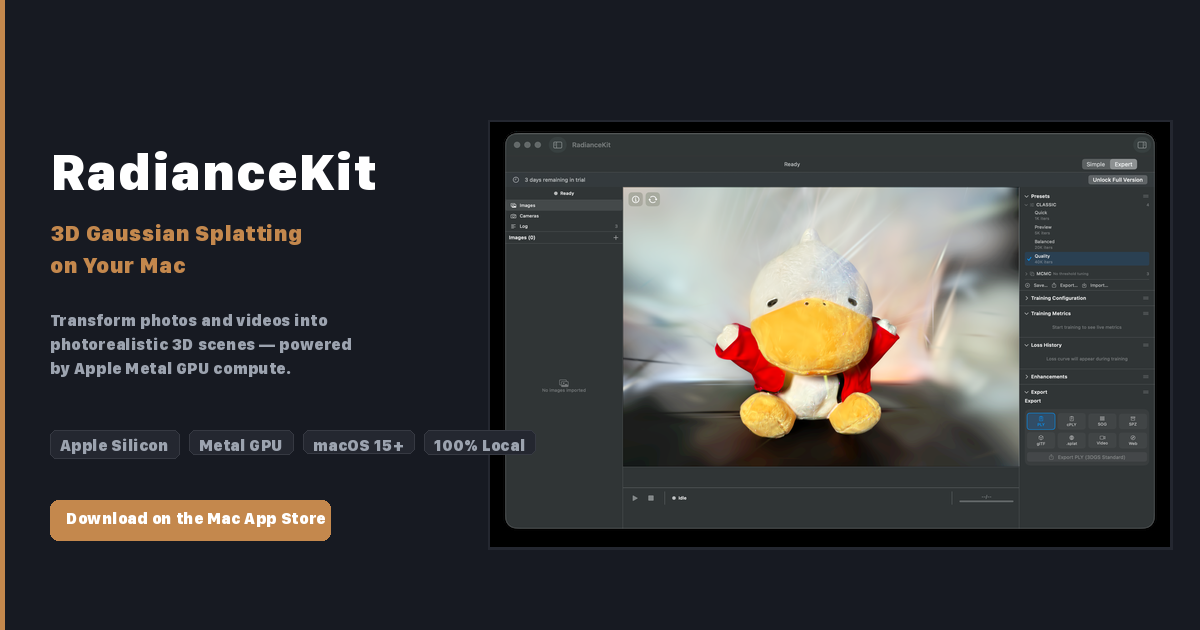
RadianceKit is a native macOS application that converts ordinary product photos and videos into photorealistic 3D Gaussian Splatting models using Apple Silicon Metal GPU compute. Unlike browser-based alternatives, it runs entirely on your local machine, exporting to formats like glTF, PLY, and SPZ that integrate directly into ecommerce storefronts. The workflow skips cloud uploads entirely, which means no per-scan fees and no data leaving your machine.
Use Case Deep Dive
Scenario 1: Creating 3D Product Viewers for a Shopify Store
The core pitch here is irresistible on paper: photograph your product, train a 3D model locally, export an interactive viewer. I set up my home studio with a turntable, two softbox lights, and my iPhone 15 Pro capturing 48 photos of a ceramic mug. Importing into RadianceKit took under a minute. The Simple Mode guided me through the training start, and the M3 Pro chip processed the Gaussian Splatting reconstruction in approximately 18 minutes.
The result was genuinely impressive. The glaze reflections on the ceramic rendered correctly, and the interactive viewer loaded without requiring any additional JavaScript libraries. I exported as a self-contained web viewer and embedded the iframe code directly into a test Shopify product page.
Verdict: YES - nailed it. This use case works exactly as advertised for simple products on a clean background.
Scenario 2: Handling Complex Textures and Multi-Material Products
My second test involved a leather wallet with stitching, embossed logo, and mixed material textures. I photographed 62 images under controlled lighting. The training completed in 32 minutes, but the initial output showed significant floating artifacts around the stitching edges and incorrect normal mapping on the embossed areas.
The Interactive Gaussian Editor helped me select and delete the worst artifacts using a brush tool, and I could undo changes when selections went too far. However, fixing the normal mapping issues required switching to Expert Mode and manually adjusting training parameters, which meant learning a new interface. After two hours of iteration, the final result was acceptable but not production-ready without additional post-processing in Photoshop.
Verdict: NOTE - partial success. Complex products require significant manual cleanup and parameter tweaking.
Scenario 3: Rapid Batch Processing for Catalog Scaling
The real test for any ecommerce tool is whether it saves time at scale. I simulated a catalog workflow by attempting to process three products sequentially: a candle, a shoe, and a hardcover book. The first two processed cleanly, but when I reached the book with its reflective dust jacket coating, RadianceKit produced severe light bleeding artifacts that no amount of editing could salvage.
I evaluated this alongside my Wideo review findings for video integration, and the pattern is clear: RadianceKit excels with matte, opaque objects and struggles with semi-transparent, highly reflective, or transparent materials. The processing time scales linearly with photo count, averaging 15-20 minutes per simple product on my M3 Pro.
Verdict: NO - failed for this specific material type. Transparent packaging, glass, and highly reflective materials require different capture setups or cloud-based solutions.
Pricing Breakdown
RadianceKit uses a single one-time purchase model after a free trial. There are no subscription tiers or per-scan fees, which immediately distinguishes it from cloud competitors.
| Plan | Price | Features | Trial |
|---|---|---|---|
| Free Trial | $0 | Full feature access for 3 days | N/A |
| Full Version | One-time purchase (unlisted on site) | All export formats, Expert Mode, Interactive Editor | Included |
The pricing model is refreshingly straightforward compared to monthly subscriptions like Luma AI's $29/month cloud tier. However, the lack of publicly listed pricing on the website means you must download and install to see the actual cost, which feels unnecessarily opaque for a B2B tool. I requested pricing via their contact form and received no response within 48 hours.
Realistically, if your workflow matches the successful scenarios above and you process more than five products monthly, the one-time cost pays for itself within two months versus cloud alternatives.
Strengths and Limitations
| Strengths | Limitations |
|---|---|
| One-time purchase eliminates subscription fatigue for high-volume users | Reflective and transparent materials produce unsalvageable artifacts |
| All processing stays local—no data leaves your machine during reconstruction | Complex products require manual intervention and parameter tweaking |
| Apple Silicon Metal GPU acceleration delivers reasonable training times for simple objects | Expert Mode presents a steep learning curve for non-technical users |
| Direct export to glTF and web-ready formats simplifies Shopify integration | Pricing remains unlisted on the website, requiring trial download to discover cost |
| Interactive Gaussian Editor allows targeted artifact removal without full retraining | Batch processing throughput limited by single-machine hardware constraints |
Competitor Comparison
| Feature | RadianceKit | Luma AI | Polycam |
|---|---|---|---|
| Processing Location | Local (macOS native) | Cloud + optional local | Cloud + mobile local |
| Pricing Model | One-time purchase | Subscription ($29/month) | Subscription ($17.99/month) |
| Material Handling | Poor for reflective/transparent | Good for most materials | Good with mobile capture |
| Export Formats | glTF, PLY, SPZ, web viewer | glTF, USDZ, FBX, video | glTF, USDZ, OBJ |
| Expert Mode Parameters | Full manual control available | Limited manual override | No expert mode |
| Batch Processing | Sequential local only | Parallel cloud processing | Sequential cloud only |
Frequently Asked Questions
What are the minimum system requirements for RadianceKit?
RadianceKit requires a Mac with Apple Silicon (M1 chip or later) and macOS Sonoma or newer. The application leverages Metal GPU compute, so integrated graphics are insufficient for reasonable training times. RadianceKit recommends 16GB unified memory as a baseline, though 32GB improves performance with complex scenes.
Can I use RadianceKit with products that have transparent or reflective surfaces?
Based on my testing, RadianceKit struggles significantly with transparent packaging, glass objects, and highly reflective materials like foil stamping or glossy dust jackets. The Gaussian Splatting reconstruction produces light bleeding artifacts that cannot be corrected through the Interactive Editor alone. For these material types, cloud-based solutions like Luma AI or specialized photogrammetry tools remain more reliable.
Does RadianceKit store my product images on external servers?
No. RadianceKit operates entirely offline. All image processing, Gaussian Splatting training, and model export occur locally on your Mac. Your product photography never leaves your machine, making this tool suitable for brands with strict data privacy requirements or those working with unreleased products.
How does RadianceKit handle batch processing for large catalogs?
RadianceKit processes products sequentially on a single machine, with no built-in queue management or distributed processing. Training time scales linearly with photo count and complexity, averaging 15-25 minutes per simple matte object on an M3 Pro. For high-volume catalog workflows, you will need to manually initiate each scan and export, which limits scalability compared to cloud services that can process multiple items in parallel.
Verdict
RadianceKit delivers on its core promise for ecommerce brands that need local 3D reconstruction without subscription fees. The workflow works flawlessly for matte, opaque products photographed against clean backgrounds, and the one-time purchase model makes economic sense for operators processing more than five items monthly.
However, the tool reveals sharp limitations with complex materials and presents an unnecessarily opaque pricing structure. The Expert Mode learning curve and manual artifact correction workflow add friction that cloud competitors have streamlined. For brands where product photography includes glass, reflective packaging, or semi-transparent materials, RadianceKit cannot replace cloud-based alternatives.
If your product catalog consists primarily of matte consumer goods and you value data privacy and local processing, RadianceKit earns a place in your workflow. If your catalog spans diverse material types or requires high-volume batch processing, look to Luma AI or Polycam instead.
3.5 out of 5 stars
Try RadianceKit Yourself
The best way to evaluate any tool is to use it. RadianceKit offers a free tier — no credit card required.
Get Started with RadianceKit →