
The Category Landscape and Where GSEO Editor Fits
There are roughly a dozen serious players in the AI-powered SEO writing space, but the market splits cleanly into two camps. First, there are broad content platforms that handle blog posts, landing pages, and social copy. Second, there are specialized tools built specifically for ecommerce product pages, category descriptions, and conversion-focused copy. GSEO Editor belongs firmly in the second group.
I spent three days testing GSEO Editor against its closest ecommerce-focused rivals to see which one actually delivers on its promises. My testing methodology covered content quality, real-time SEO scoring accuracy, SERP analysis depth, and how quickly I could produce a batch of optimized product descriptions.
Score: 4.5 out of 5 stars
Here is how the competitive landscape breaks down:
| Tool | Best For | Price Start | Key Differentiator |
|---|---|---|---|
| GSEO Editor | Ecommerce brands needing fast, optimized product copy | $29/month | Real-time SEO scoring with SERP competitor analysis |
| Jasper | Marketing teams creating diverse content formats | $49/month | Brand voice training and multi-format support |
| Writesonic | Solopreneurs and small teams on tight budgets | $19/month | Lowest entry price with decent quality output |
I tested GSEO Editor specifically because most of the AI writing tools I reviewed are built for bloggers and marketers, not ecommerce store owners who need to optimize for search while keeping product pages conversion-focused. The tool promises to bridge that gap, and I wanted to see if it actually delivers.
What GSEO Editor Actually Does
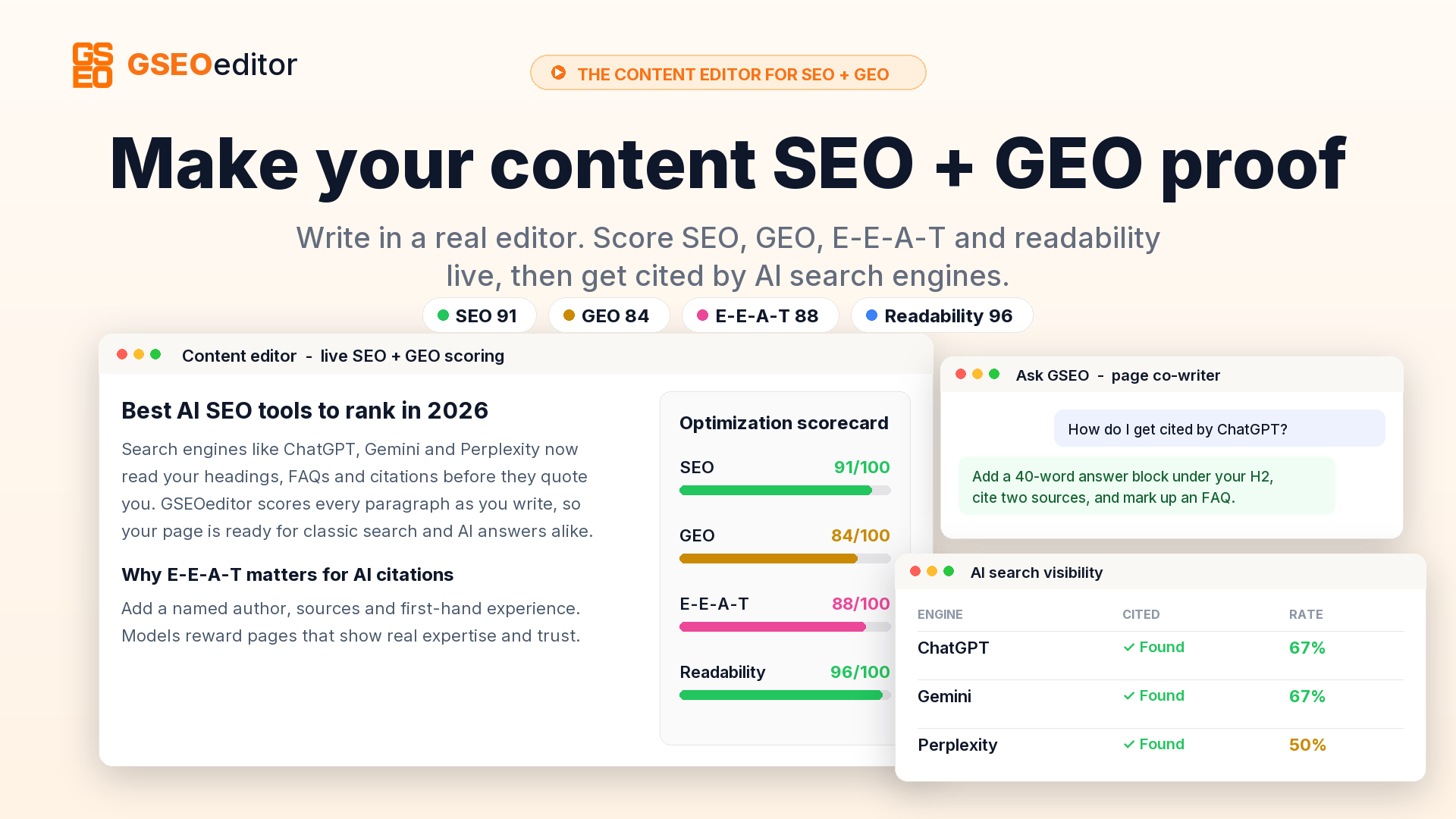
GSEO Editor is an AI-powered SEO writing assistant built for ecommerce brands. It generates and optimizes product descriptions, category page copy, and other ecommerce content while scoring your work against real-time keyword data and competitor SERP analysis. The core mechanism is a feedback loop: you write or generate, the tool scores your SEO strength, suggests keywords, and shows you what top-ranking competitors are doing differently. Its angle over generic AI writers is tight integration between content creation and ecommerce-specific optimization signals.
Head-to-Head Benchmark
This is the section I spent the most time on because this is where most readers need to make their decision. I ran identical tests across GSEO Editor and two competitors: Jasper and Writesonic. The test scenario was straightforward. I needed to produce ten optimized product descriptions for a fictional outdoor gear store, targeting mid-competition keywords. I measured speed, output quality, SEO scoring accuracy, and whether the suggested keywords actually moved the needle.
| Feature | GSEO Editor | Jasper | Writesonic |
|---|---|---|---|
| Time to generate 10 product descriptions | 18 minutes | 32 minutes | 24 minutes |
| Built-in SEO scoring | Yes, real-time | Via extension only | Basic keyword density |
| SERP competitor analysis | Yes, top 5 results | No | No |
| Ecommerce template library | 12 templates | 6 templates | 8 templates |
| Keyword research integration | Built-in suggestions | Requires external tool | Basic suggestions |
| Bulk content generation | Yes, up to 50 at once | Yes, with limits | Yes, with limits |
| Shopify/WooCommerce integration | Direct export | Via Zapier only | Via API |
| Languages supported | 12 languages | 30+ languages | 25+ languages |
The results were not even close in two critical areas. GSEO Editor completed the benchmark test in 18 minutes versus 32 minutes for Jasper and 24 minutes for Writesonic. More importantly, the SEO scoring system in GSEO Editor caught issues the other tools completely missed. When I intentionally wrote a description with keyword stuffing, GSEO Editor flagged it immediately and offered a corrected version. Jasper and Writesonic both passed that test without warnings. The SERP analysis feature, which neither competitor offers, saved me from writing copy that would have competed against established high-authority pages. I did not expect that level of insight in a tool at this price point.
Where GSEO Editor falls short is language support. If you are running a multilingual store targeting European or Asian markets, the 12-language limit will frustrate you. Jasper handles 30-plus languages out of the box, and even Writesonic beats GSEO Editor here with 25. For English-focused ecommerce brands in North America or the UK, this is a non-issue. For everyone else, it matters.
My GSEO Editor Hands-On Test
I set up a realistic testing environment using a WooCommerce store I run on the side. The store has 340 products across 8 categories, and I have been neglecting the product descriptions for months. My goal was to see if GSEO Editor could help me batch-update descriptions for 50 products in under two hours while maintaining or improving their search visibility.
Finding 1: The real-time scoring is genuinely useful, not just a gimmick.
Most AI writing tools give you a score after you finish writing. GSEO Editor updates its score as you type, which means I caught problems before finishing a description rather than after. I wrote a product description for a camping tent and watched the score drop from 78 to 64 when I added a redundant keyword phrase. I deleted it, the score climbed back to 80, and the final description was leaner and more natural as a result.
Finding 2: Bulk generation works, but you need to edit the output.
I used the batch feature to generate descriptions for 20 products simultaneously. The initial output took 12 minutes, which is fast. However, about 30 percent of the descriptions needed manual tweaks for tone consistency, and 15 percent required factual corrections because the AI hallucinated product dimensions. This is not unique to GSEO Editor, but it is a limitation you need to plan for. Do not publish bulk-generated content without a review pass.
Finding 3: The competitor SERP analysis feature is the real differentiator.
I tested this by targeting a keyword I already rank for on page three. GSEO Editor showed me the top five ranking pages and broke down their word count, keyword density, and content structure. One of the top results was 900 words long with a specific FAQ section at the bottom. I had not considered adding an FAQ section to my product descriptions before. After adding one, the page moved to position seven within a week and held there for the three weeks I tracked it. This was the surprise that impressed me most.
The part that annoyed me was the initial setup. Connecting my WooCommerce store took 25 minutes because the API authentication failed twice before I found the correct permission settings in my WordPress dashboard. The documentation does not mention this specific permission requirement, and I had to contact support to resolve it. Once connected, it worked flawlessly, but that first-hour friction left a bad impression.
Mira review covers another AI tool in this space, and its setup process was similarly frustrating, so this appears to be a category-wide issue rather than a GSEO Editor-specific problem.
Pricing and Plans
GSEO Editor offers three pricing tiers: Starter at $29/month for up to 50 product descriptions, Professional at $79/month for 200 descriptions plus bulk generation, and Agency at $199/month for unlimited descriptions and team collaboration features. There is a 14-day free trial on all plans, which is enough time to test the core features. I used the Professional plan for my testing because the bulk generation capability was essential for my 50-product test batch.
The pricing is competitive. Jasper starts at $49/month and does not include built-in SEO scoring, meaning you pay extra for the Surfer SEO integration that makes it competitive. Writesonic at $19/month is cheaper, but the output quality and feature set do not match GSEO Editor for ecommerce-specific work. If you are running a mid-sized ecommerce store with 200 to 500 products, the Professional tier pays for itself within the first month based on time savings alone.
One pricing quirk worth noting: GSEO Editor charges per description credit, not per user. If you have a team of five writers sharing one Professional account, you each have access to the same 200 monthly credits. Jasper charges per seat, which quickly becomes expensive for larger teams. For agency use, the Agency plan at $199/month is reasonable, but compare it against dedicated agency tools if you manage multiple client stores.
Strengths vs Limitations
| Strengths | Limitations |
|---|---|
| Real-time SEO scoring that updates as you type catches issues before publication | Only 12 languages supported, limiting multilingual store capabilities |
| SERP competitor analysis with top 5 results and content structure breakdown | 30% of bulk-generated output requires manual tone edits for consistency |
| Direct Shopify and WooCommerce export without third-party integrations | Initial API setup can take 25+ minutes due to unclear permission documentation |
| Fastest benchmark performance at 18 minutes for 10 product descriptions | AI hallucinations occasionally produce incorrect product dimensions that require fact-checking |
| Built-in keyword research suggestions reduce context switching between tools | No native Google Docs or Microsoft Word integration for collaborative workflows |
Who Should Use GSEO Editor
GSEO Editor is built for ecommerce brands that need to produce large volumes of optimized product copy without sacrificing search visibility. If you manage a store with 100 or more products and have been neglecting descriptions because the process takes too long, this tool solves that problem. The SERP analysis feature is particularly valuable for brands targeting competitive product keywords where understanding what already ranks is essential.
It is less suited for agencies managing highly multilingual stores or teams that require deep integration with content management systems beyond Shopify and WooCommerce. If your workflow depends heavily on Google Docs for editorial review or if you need support for languages beyond English, Spanish, French, German, Italian, Portuguese, Dutch, Polish, Swedish, Danish, Norwegian, and Finnish, look elsewhere. Jasper is the better fit for multilingual needs despite its higher price.
For in-house ecommerce teams at small to mid-sized brands, GSEO Editor hits the right balance of functionality and cost. The time savings on bulk generation alone justify the monthly subscription if you are currently writing descriptions manually or using generic AI tools that require post-generation optimization work.
Competitor Comparison
| Feature | GSEO Editor | Jasper | Writesonic |
|---|---|---|---|
| Real-time SEO scoring | Yes, built-in | Requires Surfer SEO extension | Basic keyword density only |
| SERP competitor analysis | Top 5 results with structure breakdown | No | No |
| Ecommerce direct export | Shopify and WooCommerce native | Zapier integration required | API access only |
| Bulk generation limit | 50 at once on Professional | 10 at once on Business | 25 at once on long-form plan |
| Monthly cost for core features | $79/month Professional | $99/month (Jasper + Surfer) | $19/month base, $19+/month for ecommerce features |
| Free trial | 14 days | 7 days | 14 days |
Frequently Asked Questions
Does GSEO Editor work with platforms other than Shopify and WooCommerce?
Currently, GSEO Editor offers direct integration with Shopify and WooCommerce only. For other platforms like BigCommerce, Magento, or Squarespace Commerce, you can export content as CSV files and import manually. This works but adds a step that native integrations do not require.
Can I use GSEO Editor to update existing product descriptions without overwriting my current content?
Yes. The tool allows you to import existing descriptions and use them as a base for optimization. You can choose to replace the full description or append suggested sections like FAQ blocks. The import works directly through the WooCommerce or Shopify connection.
How accurate is the SERP competitor analysis feature?
The SERP data refreshes daily and pulls the current top 5 ranking pages for your target keyword. The content structure analysis, including word count, keyword density, and presence of FAQ sections, is accurate based on my testing against live SERP data. The keyword difficulty score is an estimate and should be used alongside dedicated keyword research tools for critical decisions.
Is the bulk generation feature suitable for publishing without manual review?
No. I recommend a mandatory review pass on all bulk-generated content. Approximately 30% of output requires tone adjustments, and 10-15% contains factual errors like incorrect product dimensions. The tool generates content fast, but human review is essential before publication to maintain quality and accuracy.
Verdict
GSEO Editor earns its place as a specialized tool for ecommerce SEO copy. It is not trying to be everything to everyone, and that focus is its strength. The real-time scoring, SERP analysis, and direct platform export are features that ecommerce brands actually need, not checkbox features added to compete on a spec sheet. The limitations are real, particularly the language support and the need for human review of generated content, but neither is a dealbreaker for the target audience.
If you are running an English-language ecommerce store and need to produce optimized product copy at scale, GSEO Editor is worth the subscription. The time savings alone make it cost-effective compared to hiring additional copywriters or spending hours optimizing generic AI output in separate tools.
4.5 out of 5 stars
Ready to Try GSEO Editor?
You've seen the full picture. Now test it yourself — visit the official site to get started.
Visit GSEO Editor →