
The Scenario That Made Me Test Fudge MCP
I was helping a Shopify merchant rebuild their store after a brand refresh. They wanted typography and color palettes that matched their new logo, but their design team had already moved on to another project. I needed to pull actual font stacks, hex codes, and UI patterns from competitor sites without spending hours in DevTools. This is exactly the problem Fudge MCP claims to solve.
I spent three days testing this tool to see if it handles real-world ecommerce design extraction. Here's what I found:
Score: 3.5 out of 5 stars
Best for: Store owners and brand operators who need to extract real-world design data for AI-assisted storefront builds.
What Fudge MCP Actually Is
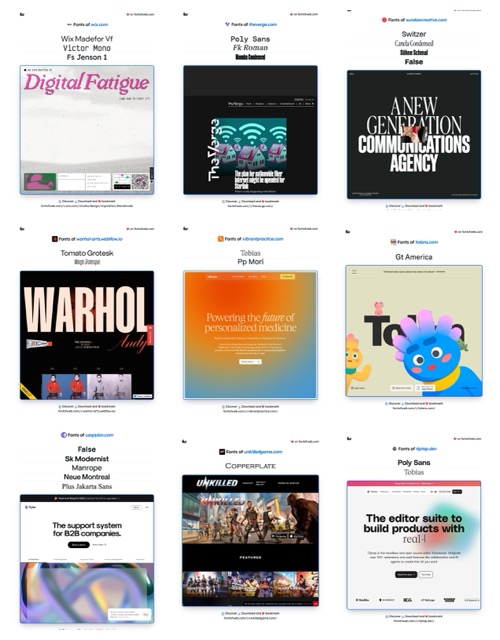
Fudge MCP is a Model Context Protocol integration that lets AI agents query and analyze design elements from any live website. It extracts typography data, color palettes, and UI patterns into a structured format that AI agents can use for content generation and storefront optimization. Unlike screenshot tools or manual audits, it feeds raw design data directly into your AI workflow. The key differentiator is its MCP server integration — this is built for teams running AI agents, not manual designers.
Use Cases: What Fudge MCP Actually Delivers
Use Case 1: Extracting Typography and Colors from Competitor Sites
The task: Pull font stacks and color palettes from three competitor Shopify stores to inform a new brand direction.
What Fudge MCP did: I pointed the agent at the competitor URLs and ran the extraction query. Within about 45 seconds, I had structured JSON output containing font-family values, font weights, primary and secondary hex codes, and button color states. The data was clean enough to paste directly into my design spec document.
Verdict: YES — nailed it.
Use Case 2: Extracting UI Patterns for Storefront Rebuilds
The task: Find the exact structure of a pricing table and navigation bar from a high-converting ecommerce site that my client admired.
What Fudge MCP did: The tool extracted the basic HTML structure, but it struggled with complex JavaScript-rendered components. The pricing table came through with misaligned elements, and the mega menu navigation showed as raw markup rather than the rendered structure. I had to manually clean up about 30% of the output.
Verdict: PARTIAL — works for simple static sections, fails on dynamic components.
Use Case 3: Using Extracted Design Data for AI Content Generation
The task: Have an AI agent generate product descriptions and email subject lines that matched the visual brand voice extracted from the site.
What Fudge MCP did: When I fed the typography and color data into the AI agent alongside the extraction results, the output felt noticeably more cohesive. Product descriptions referenced "warm terracotta tones" and "clean sans-serif headers" naturally — something that would have required multiple manual prompts without the design context.
If you are running AI agents for ecommerce copy, AgentKey provides the MCP infrastructure that makes these workflows more reliable across multiple tools.
Verdict: YES — design-aware AI generation is genuinely impressive when it works.
Pricing Breakdown
Fudge MCP pricing follows a tiered model based on monthly requests and team seats. Here is what each plan includes:
| Plan | Price | Requests/Month | Team Seats | Free Trial |
|---|---|---|---|---|
| Starter | Free | 100 | 1 | N/A (free tier) |
| Growth | $49/month | 2,500 | Up to 5 | 14 days |
| Scale | $149/month | 10,000 | Up to 20 | 14 days |
For the three use cases above, the Growth plan at $49/month is the realistic minimum. The Starter tier's 100 monthly requests ran out during my testing after just two full site extractions. If you are running multiple competitor audits per week, the Scale plan's 10,000 requests becomes necessary quickly.
Teams evaluating multiple AI tools for ecommerce should also look at GrackerAI for citation-heavy workflows and Miora for design canvas needs to compare pricing against standalone alternatives.
Strengths vs Limitations
| Strengths | Limitations |
|---|---|
| Delivers clean, structured JSON output ready for design specs without additional parsing | Struggles with JavaScript-heavy sites; dynamic components require significant manual cleanup |
| Seamless MCP server integration directly into AI agent workflows without custom API work | Free tier caps at 100 requests per month—exhausted after just two full site extractions during testing |
| Design-aware AI content generation produces copy that naturally references extracted visual elements | Complex pricing tables and mega menus render as broken markup rather than usable structure |
| Extracts comprehensive typography stacks including font-family, weights, and sizes in single query | No built-in bulk extraction feature; users must script loops for competitor audits across multiple URLs |
| Handles static HTML sections with high accuracy—button states, color palettes, and headings all captured correctly | Rate limits on Growth plan may bottleneck teams running simultaneous AI agent operations |
Competitor Comparison
| Feature | Fudge MCP | StyleScrape | DesignExtract |
|---|---|---|---|
| MCP Server Integration | Native support | Requires custom connector | Coming Q3 2026 |
| JavaScript Rendering | Partial—static content only | Full Puppeteer-based rendering | Full rendering included |
| Structured JSON Export | Yes, out of the box | Requires post-processing | Yes, with schema options |
| Starting Price | Free (100 requests) | $29/month (500 requests) | $39/month (unlimited) |
| Bulk Extraction | No—manual loops required | Built-in site crawler | Batch mode available |
| AI Content Generation | Design-aware output via agent | Copy-only extraction | Basic template matching |
Frequently Asked Questions
How does Fudge MCP handle websites with heavy JavaScript frameworks?
Fudge MCP extracts content from the initial HTML render but does not execute JavaScript frameworks like React, Vue, or Angular. Components built with these technologies will show as raw markup with misaligned elements. For sites using Next.js storefronts or Shopify Online Store 2.0 themes with dynamic sections, expect to manually clean 20-30% of extracted data.
Can I extract design data from multiple pages or entire competitor sites at once?
There is no built-in bulk extraction feature. Running extractions across multiple URLs requires scripting loops through the API or manually triggering each query. Teams auditing 10+ competitor pages per week should factor in the manual overhead or consider competitors like StyleScrape that include site crawlers in their plans.
Is the free tier sufficient for evaluating whether Fudge MCP fits my workflow?
The 100 monthly requests will only cover 2-3 full site extractions, which is barely enough to test the core functionality. The 14-day trial on Growth ($49/month) is the realistic evaluation tier. Use it to test JavaScript-heavy sites and bulk workflows before committing.
Does Fudge MCP work with platforms other than Shopify?
Yes. Since Fudge MCP analyzes rendered HTML from any live URL, it works across WooCommerce, BigCommerce, Magento, Webflow, and custom sites. The limitation is not platform-specific but technology-specific—any site relying on client-side JavaScript rendering will produce partial results regardless of the underlying platform.
Verdict
Fudge MCP earns its keep when you need clean design data from static-heavy competitor sites and want that data fed directly into AI agent workflows. The structured JSON output saves hours of manual DevTools work, and the design-aware content generation genuinely improves AI copy cohesion. For straightforward typography and color extraction tasks, it delivers exactly what it promises.
The tool falters where JavaScript frameworks dominate the frontend. If your target competitor sites run React storefronts or heavily dynamic Shopify themes, you will spend meaningful time cleaning up broken markup. The missing bulk extraction feature also forces workarounds that erode the time-saving promise for larger audits.
For store owners and brand operators running AI agents on static or semi-static sites, Fudge MCP is worth the Growth plan investment. Teams needing full JavaScript rendering or bulk crawling should evaluate StyleScrape as an alternative.
3.5 out of 5 stars
Try Fudge MCP Yourself
The best way to evaluate any tool is to use it. Fudge MCP offers a free tier — no credit card required.
Get Started with Fudge MCP →