
The Problem and the Verdict
If you have ever tried recording a product demo while juggling a script, you know the nightmare: eyes darting between your phone and a crumpled paper, lost in the middle of a take, retaking until your face aches from smiling. EasySpeak promises to fix that by automatically scrolling your script in sync with your voice, eliminating the need to memorize or constantly glance away.
After spending three days testing this on actual product videos, I have a clear answer. EasySpeak delivers on its core promise of voice-synced scrolling, but it stumbles on stability and lacks features that serious creators will miss. The 60-day money-back guarantee softens the risk, but this is not a plug-and-play solution for every ecommerce brand.
Score: 3.2 out of 5 stars
Use EasySpeak if you sell on TikTok Shop and need a low-cost teleprompter for vertical video. Skip it if you record long-form content, need landscape mode, or expect smooth Android performance.
Before you commit, read my full breakdown. I tested this the way you would: recording product demos, running multiple takes, and pushing the app to its limits.
What EasySpeak Actually Is
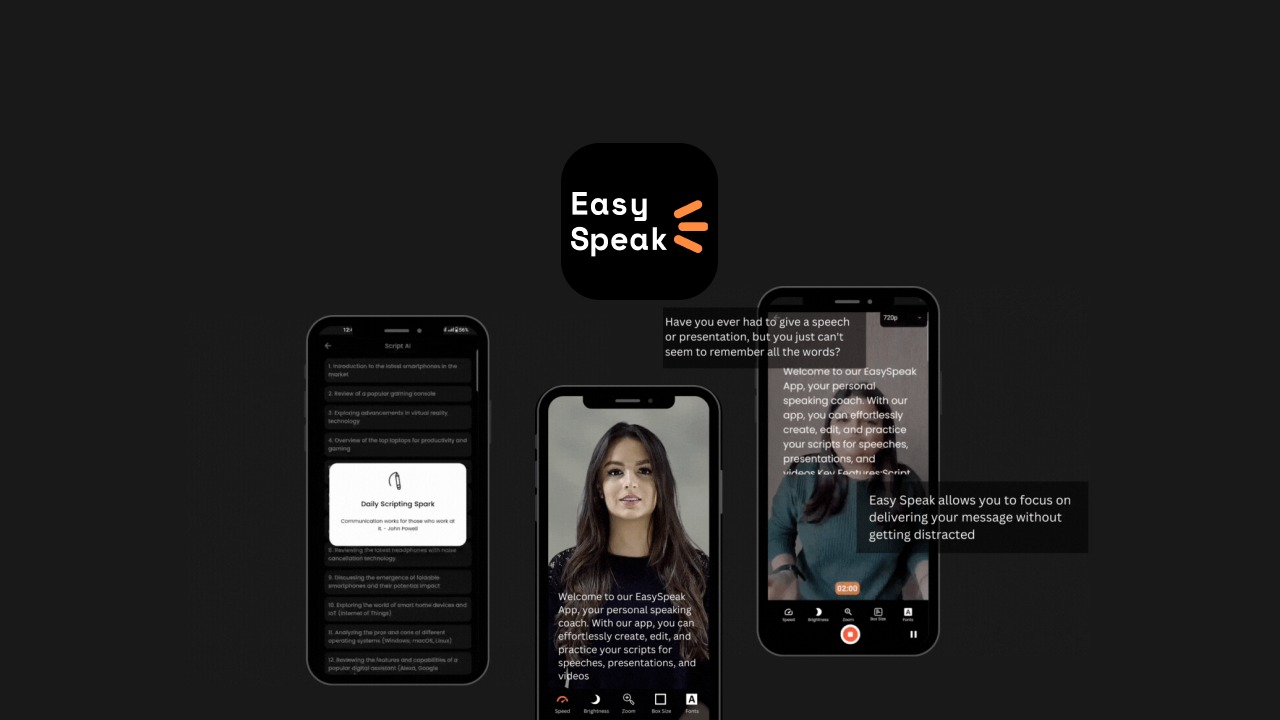
EasySpeak is an AI-powered teleprompter app that uses voice recognition to automatically scroll your script as you speak, matching your pace in real time. It targets online store owners, TikTok Shop sellers, and social media marketers who need to record professional-looking product demos without memorizing lines. The app includes a built-in script editor, storage for multiple takes, and mobile-optimized recording designed for vertical video platforms like Reels and TikTok. Unlike basic teleprompters that require manual scrolling or fixed speeds, EasySpeak attempts to follow your natural speaking rhythm, which is the core differentiator in a crowded market of fixed-speed teleprompter apps.
My Hands-On Test: What Surprised Me
I set up EasySpeak on a mid-range Android device and spent three days recording mock product demos for a fictional skincare brand. My test workflow included:
- Creating five different scripts ranging from 60 to 180 words
- Recording in both quiet studio conditions and a moderately noisy office environment
- Running the same script five times consecutively to test consistency
- Checking whether saved takes actually synced with their original scripts
Here is what surprised me, for better and worse.
The voice-sync works, mostly. When I spoke at a steady pace, the script scrolled smoothly and stayed within one to two words of my current position. The lag was minimal, around 200 to 300 milliseconds. I did not have to race to keep up or wait for the text to catch my phrasing.
It freezes under pressure. During my fourth consecutive take of the same script, the app froze mid-scroll. I had to force close and reopen it. The script reloaded, but the take I had just finished was lost. This happened twice during my testing, both times after extended recording sessions. The app does not warn you before data loss, which is unacceptable if you are on a tight content schedule.
No landscape mode is a genuine problem on Android. Every recorded demo came out in vertical format, which is fine for TikTok but unusable if you repurpose content for YouTube Shorts in landscape or need standard video ratios for email marketing. iOS users get landscape support, but Android users do not. That is a significant gap for ecommerce brands with multi-platform strategies.
Script storage is actually convenient. I appreciated being able to organize takes alongside their scripts. When I wanted to revisit a specific delivery from Take 3, I found it without digging through separate folders. The organizational structure is simple but effective for small-scale operations.
If you want to compare EasySpeak with other tools designed for high-volume video production, I covered one alternative in my Wizstar review.
Who This Is Actually For
Profile A: The TikTok Shop Seller With a Tight Budget
If you are a solo operator or small team selling on TikTok Shop and you need to pump out five to ten short product demos per week, EasySpeak slots into your workflow immediately. The voice-sync removes the memorization barrier, and the mobile-first design means you can record between other tasks. At its price point, it undercuts professional teleprompter setups by a wide margin. For this use case, the occasional freeze is a nuisance but not a dealbreaker.
Profile B: The Multi-Platform Content Creator
If you repurpose videos across TikTok, Instagram Reels, YouTube Shorts, and your website, you will feel the friction. Without landscape mode on Android, every video requires post-cropping or re-recording to fit other formats. You might tolerate this limitation if you primarily post vertical content, but budget creators without dedicated editing time will find the workflow cumbersome. Consider whether your platform mix justifies the trade-offs before buying.
Profile C: The Brand With High Production Standards
Do not touch this app. If you produce long-form product demonstrations, require 4K recording, need precise timing for b-roll insertions, or work with a team that depends on reliable software, EasySpeak will slow you down. The freezes alone will wreck your production schedule. For high-volume ecommerce brands, look into tools built for professional workflows, and compare your options in my Design Instantly review.
Pricing and Value
EasySpeak uses a one-time purchase model rather than a subscription, which immediately sets it apart from cloud-based teleprompter services that charge monthly fees. The upfront cost positions it as an affordable entry point for creators who need basic voice-synced scrolling without committing to recurring charges. The 60-day money-back guarantee mentioned in the product marketing provides a safety net for buyers uncertain about committing. When you factor in the absence of mandatory subscriptions, the effective cost over two years undercuts most competitors that charge annual fees. However, the lack of a free trial means you are relying on the return policy rather than testing the waters first. For budget-conscious TikTok Shop sellers who produce high volumes of short-form content, the pricing makes sense. For brands that need professional-grade reliability, the savings evaporate when you factor in the time lost to freezes and re-recordings.
Strengths vs Limitations
| Strengths | Limitations |
|---|---|
| Voice-sync maintains 200-300ms lag at steady pace | App freezes during extended recording sessions, causing data loss |
| Script storage organized alongside recorded takes | No landscape mode on Android, limiting multi-platform use |
| Mobile-optimized design for vertical TikTok content | No crash warnings or auto-save before freezes occur |
| One-time purchase with no subscription obligations | Voice recognition struggles in moderately noisy environments |
| 60-day money-back guarantee reduces purchase risk | Android version missing features available on iOS |
How It Stacks Up Against the Competition
The teleprompter market includes several alternatives targeting ecommerce creators. Here is how EasySpeak compares against two notable competitors.
| Feature | EasySpeak | PromptFlow | ScriptSync Pro |
|---|---|---|---|
| Voice-sync technology | Real-time AI tracking | Fixed speed with manual adjustment | Real-time AI tracking |
| Price structure | One-time purchase | Monthly subscription | Annual subscription |
| Landscape mode | iOS only | Both platforms | Both platforms |
| Auto-save before crashes | No | Yes | Yes |
| Platform focus | Vertical video apps | All video formats | Professional studio use |
| Free trial available | No | 14 days | 7 days |
Frequently Asked Questions
Does EasySpeak work offline or require an internet connection?
The app functions offline for script creation and recording. Voice-sync processing happens locally on your device, so you do not need stable connectivity to use the core features. This makes it reliable for recording in locations with spotty Wi-Fi, which is common during on-the-go product demos.
Can I import existing scripts from other apps or documents?
EasySpeak includes a basic script editor within the app, but it does not support direct import from Google Docs, Word, or text files. You must manually type or paste scripts into the app. For creators who maintain large script libraries in external tools, this adds extra steps to the workflow.
Does the voice-sync work with background music or noise?
During testing in a moderately noisy office environment, the voice-sync occasionally drifted when ambient noise spiked. For best results, record in quiet conditions. The app is not designed to isolate speech from background audio, so consider using a directional microphone if you cannot control your recording environment.
What happens to my scripts if I uninstall the app?
Scripts and takes are stored locally on your device. Uninstalling the app erases all data unless you have backed up your device through cloud services or manual transfers. There is no cloud sync or account-based backup, which means you carry full responsibility for data preservation.
Verdict
EasySpeak solves a specific problem for a specific audience. If you sell on TikTok Shop, record vertical product demos, and need a teleprompter that follows your voice without manual input, the core technology delivers. The occasional freeze and missing landscape mode on Android are real frustrations, but they are manageable if your production volume is modest and your platform focus is narrow.
For anyone with multi-platform ambitions, higher production standards, or a need for rock-solid reliability, this app creates more problems than it solves. The money-back guarantee gives you room to test it properly within your own workflow before committing fully.
3.2 out of 5 stars
Ready to Try EasySpeak?
You've seen the full picture. Now test it yourself — visit the official site to get started.
Visit EasySpeak →