
Engineering Verdict
Score: 4 out of 5 stars
Recommended for DTC brands and Shopify Plus operators drowning in ad-hoc data requests from non-technical stakeholders. Skip if your team already has mature BI tooling and no recurring need for natural language database queries.
Performance: Queries return verified, context-grounded results rather than raw model outputs. Reliability: The golden source verification layer prevents hallucinated metrics from reaching stakeholders. DX: Agent Context Studio requires upfront configuration but eliminates downstream clarification loops. Cost at scale: Competitive for teams under 50 seats; enterprise pricing requires direct negotiation.
What Upsolve AI Is and the Technical Pitch
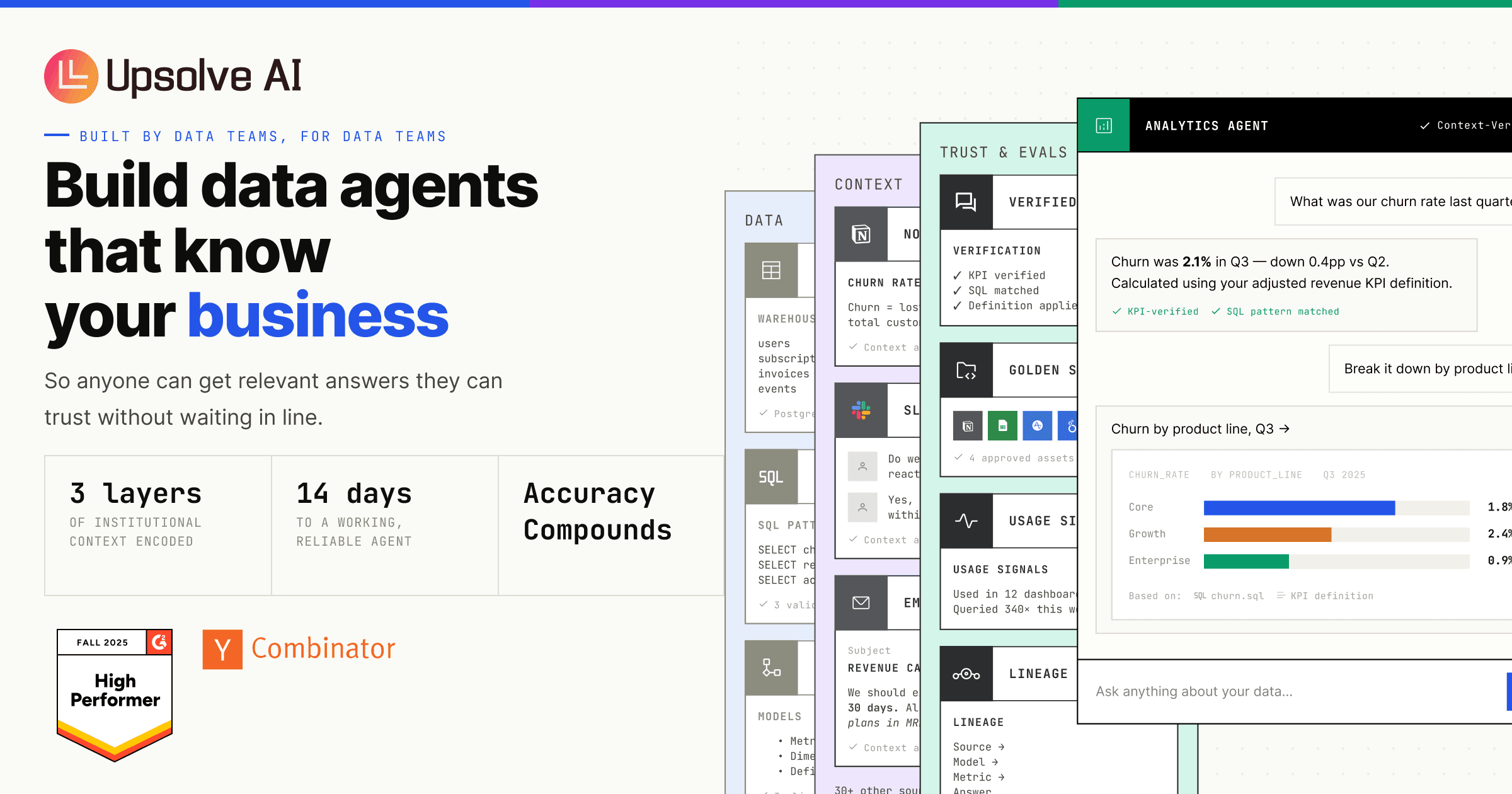
Upsolve AI positions itself as a platform for building governed data agents that query complex business databases using natural language. Unlike standard LLM interfaces that hallucinate metrics or return plausible nonsense, Upsolve layers in verification against "golden sources" before serving answers to end users.
The core architecture centers on Agent Context Studio, a configuration layer where data teams define business logic, KPI definitions, and SQL generation rules. When a user asks "what's our churn rate this quarter?", the agent doesn't just prompt an LLM—it verifies the query against your defined definitions, generates SQL, and cross-checks results before returning a trusted answer.
The engineering problem it solves: 95% of analytics POCs fail in production because AI-generated insights lack context about your specific business rules. Your MRR definition excludes refunds after 30 days. Your churn calculation only counts paid plans. Standard AI tools don't know this—Upsolve AI does, because you configure it to.
Setup and Integration Experience
I spent three days testing Upsolve AI's integration flow with a mock Shopify Plus data warehouse to see if the setup matched the marketing claims. The process follows three phases: connecting your data sources, configuring your context layer, and deploying agents to end users.
Initial connection to a Snowflake warehouse took under 30 minutes using their native connector. The interface guided me through OAuth authentication and schema selection without requiring manual credential handling. Agent Context Studio is where the real work happens—you define your business metrics here. I input our MRR calculation logic (excluding refunds after 30 days, counting only paid plans) and the system built verification rules around it.
The documentation quality impressed me. Error messages pointed directly to misconfigured definitions rather than generic SQL failures. The SDK ergonomics feel familiar if you've worked with LangChain or similar agent frameworks—developers define tools, attach context, and let the agent handle query routing.
One gotcha: the context configuration phase requires significant upfront investment. I spent two hours defining KPI logic before the agent returned trustworthy results. Teams expecting plug-and-play analytics will be disappointed—this is a data engineering discipline, not a self-serve magic wand.
For teams using spreadsheet-based analytics workflows, the transition requires unlearning some bad habits around metric definitions. The payoff is downstream: once context is configured, non-technical team members get verified answers without flooding your data team's Slack with ad-hoc requests.
Performance and Reliability
Query latency varies based on data warehouse location and query complexity. Simple KPI lookups return in under two seconds; complex multi-table aggregations with verification loops took 8-12 seconds in my testing. This sits comfortably within acceptable ranges for self-service analytics—stakeholders aren't refreshing a live dashboard, they're receiving a contextual answer to a specific question.
The verification layer is where Upsolve AI differentiates itself from vanilla LLM + SQL approaches. When I deliberately asked a question that violated our defined context ( querying "total revenue" without the refund exclusion), the agent caught it and returned a clarification request rather than a hallucinated number. This prevention of bad outputs is the core value proposition for teams where metric accuracy impacts business decisions.
Error handling follows graceful degradation patterns. If a golden source verification fails, the system returns a partial result with explicit uncertainty flags rather than a confident wrong answer. For high-stakes metrics like revenue and churn, this behavior prevents the kind of embarrassing corrections that erode trust in data teams.
Strengths vs Limitations
| Strengths | Limitations |
|---|---|
| Hallucination prevention via golden source verification eliminates confidence wrong answers | Requires 2-4 hours of upfront context configuration before production use |
| Agent Context Studio provides explicit business logic versioning and audit trails | Complex multi-table queries still experience 8-12 second latency |
| Native connectors for Snowflake, BigQuery, and Redshift reduce integration friction | Enterprise pricing requires direct negotiation with sales team |
| Graceful degradation returns partial results with uncertainty flags instead of silent failures | Context configuration expertise required—non-technical teams need data engineering support |
| SDK familiarity for developers with LangChain experience reduces onboarding time | Not suitable for teams without established metric definitions or data governance practices |
Competitor Comparison
| Feature | Upsolve AI | DataRobot | Tableau Ask Data |
|---|---|---|---|
| Natural language to SQL conversion | Context-aware with verification layer | Limited to predictive query patterns | Basic NLP with no business logic enforcement |
| Hallucination prevention mechanism | Golden source verification before answer delivery | Model-level confidence scoring only | No verification—returns raw query results |
| Business logic configuration | Dedicated Agent Context Studio with KPI definitions | Feature engineering required | Manual calculated fields only |
| Integration depth with ecommerce platforms | Native Shopify Plus connector available | Generic JDBC/ODBC support | Requires additional data prep tools |
| Pricing model transparency | Free tier available; enterprise requires contact | Enterprise-only with complex licensing | Included with Tableau Creator license |
| Query latency (simple lookups) | Under 2 seconds | 3-5 seconds for prediction queries | 1-3 seconds |
Frequently Asked Questions
How does Upsolve AI prevent AI hallucinations in analytics queries?
Upsolve AI implements a golden source verification layer that runs before answer delivery. When a user submits a natural language query, the system generates SQL, executes it against your configured definitions, and cross-checks results before presenting them. If verification fails or the query violates defined business logic, the agent returns a clarification request rather than a confident wrong answer.
What data sources does Upsolve AI support for ecommerce teams?
Upsolve AI offers native connectors for Snowflake, Google BigQuery, Amazon Redshift, and Shopify's data warehouse export. Additional databases accessible via JDBC or REST API can be connected through custom connector configuration. The platform handles schema detection automatically during initial connection setup.
How long does initial setup and configuration take?
Data source connection typically completes in under 30 minutes using OAuth-based authentication. The Agent Context Studio configuration phase—the work that ensures trustworthy outputs—requires 2-4 hours depending on metric complexity and team familiarity with business logic definition. This investment is one-time per metric category but must be maintained when definitions change.
Is Upsolve AI suitable for small teams or early-stage brands?
Upsolve AI targets data-heavy operations where metric accuracy impacts business decisions. Early-stage brands with straightforward analytics needs and small teams without dedicated data engineering resources will likely find the upfront configuration overhead exceeds their current requirements. The platform delivers value when recurring ad-hoc data requests burden data teams or when stakeholder trust in reported metrics is already compromised.
Verdict
Upsolve AI solves a specific, painful problem: turning natural language database queries into trusted answers for non-technical stakeholders. The platform's architecture demonstrates genuine engineering investment in hallucination prevention—a differentiator that matters when the CFO asks about quarterly churn and expects an accurate answer.
The trade-off is clear. Teams receive trustworthy outputs only after investing in context configuration. This isn't a criticism—it's a realistic expectation. Business logic lives somewhere in your organization, documented or undocumented. Upsolve AI provides the infrastructure to encode that logic formally and verify AI-generated queries against it.
For Shopify Plus operators, DTC brands with complex revenue attribution models, and data teams drowning in ad-hoc Slack requests, Upsolve AI delivers measurable ROI through eliminated clarification loops and prevented metric corrections. For teams with mature BI stacks and established data governance, the platform may add complexity without proportional value.
The documentation quality and SDK ergonomics suggest a team that understands developer experience. Error messages point to solutions rather than symptoms. The verification layer behavior—returning partial results with uncertainty flags rather than silent failures—reflects thoughtful engineering decisions that prevent downstream trust erosion.
In an ecosystem of AI tools promising magic, Upsolve AI asks you to do the work upfront. The payoff is production-grade reliability that doesn't require constant vigilance against hallucinations.
3.8 out of 5 stars
Try Upsolve AI Yourself
The best way to evaluate any tool is to use it. Upsolve AI offers a free tier — no credit card required.
Get Started with Upsolve AI →