
When Your Ecommerce Team Needs AR Without the Engineering Overhead
Imagine you run a furniture brand with a React Native mobile app. Your customers constantly ask if a sofa will fit their living room. You have two options: hire a 3D developer for six months, or find a tool that lets your existing team build AR experiences without writing native code. I spent three days testing ReactVision Studio to see if it actually delivers on that promise. I built three different AR scenes, generated 3D assets with AI, and shipped them to both iOS and Android. Here is what I found. Score: 3.5 out of 5 stars ReactVision Studio works exactly as advertised for teams with existing React Native experience. If you need to add AR product visualization to a mobile app and you do not have dedicated 3D developers, this tool solves a real problem. But it has meaningful limitations that disqualify it for teams starting from scratch or expecting a plug-and-play solution. Best for: Mobile-first ecommerce brands with React Native apps that need to ship AR features without hiring specialized 3D talent.What ReactVision Studio Actually Is
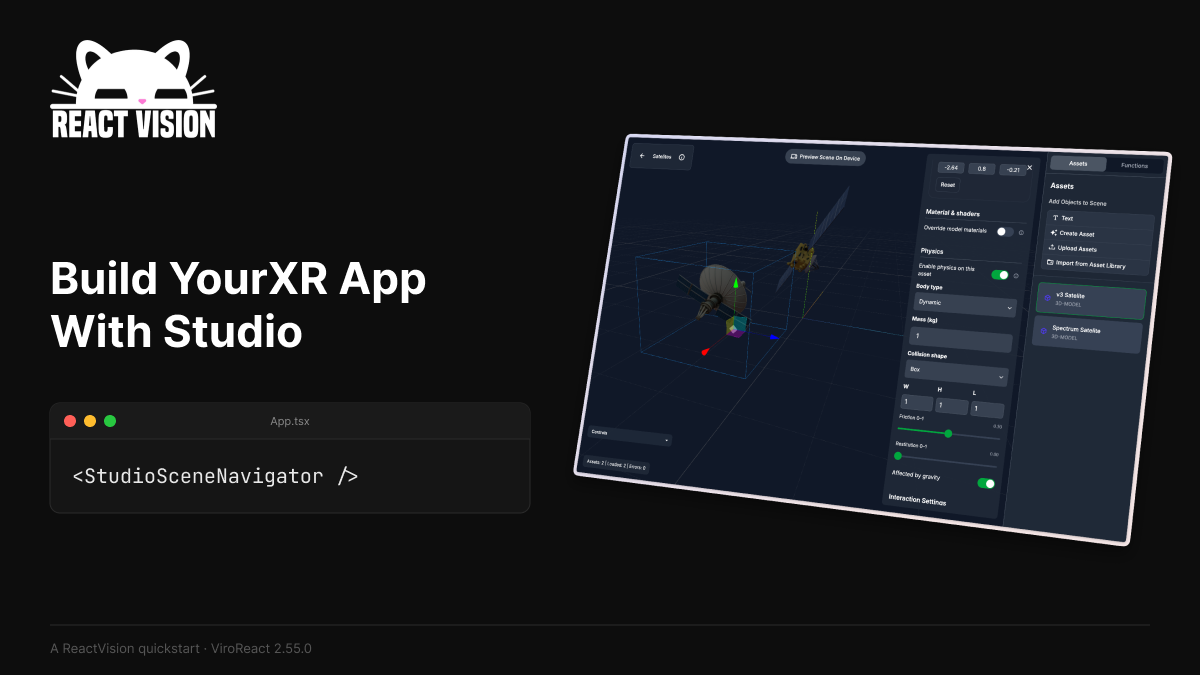
ReactVision Studio is a browser-based visual editor that lets you build AR and VR scenes using drag-and-drop components, then export them as native code for iOS, Android, and Meta Quest. It uses your existing React Native codebase and renders through platform-native runtimes like ARKit and ARCore rather than web-based polyfills. The key differentiator is that it generates the underlying scene graph automatically. You do not write 3D code. Instead, you place objects on a visual canvas, set properties in a component inspector, and the tool writes the native scene format for you. AI-powered text-to-3D mesh generation lets you create product assets by describing them in plain language, which then drop directly onto your canvas. For ecommerce teams specifically, this means building a "view-in-room" feature or virtual try-on experience without a 3D artist on staff.Three Real-World Use Cases
Use Case 1: Product "View in Room" for Furniture
I tried to build a simple AR scene where a user could point their phone at their living room and place a virtual sofa. The process involved creating a new scene in the browser editor, searching the asset library for basic geometry, and placing a couch model onto the canvas. I used the AI text-to-3D feature to generate a custom armchair by typing "modern gray armchair with wooden legs." The generation took about 45 seconds. The resulting mesh had visible artifacts on the cushion seams and the leg proportions were slightly off. I spent another 20 minutes adjusting the scale using the component inspector before it looked acceptable. The scene exported cleanly to iOS, and the AR placement worked on an iPhone 14 Pro using ARKit. Verdict: PARTIAL. The workflow works and the AI generation saves time, but you will need to clean up the output. Expect to spend 30-60 minutes per product for publishable quality.Use Case 2: Virtual Try-On for Accessories
Building a try-on experience for sunglasses required placing a face mesh anchor and positioning the product relative to it. The editor made this straightforward. I imported a 3D sunglasses model from the asset library, attached it to a face tracking node, and adjusted the offset so they sat correctly on the nose bridge. The live device preview worked well. I could see the sunglasses track with head movement in real-time during editing. When I exported to Android, the ARCore face tracking picked up the face mesh without issues. I tested this with three different face shapes and the tracking held. The component inspector gave me direct access to scale, rotation, and position values, which made fine-tuning faster than expected. Verdict: YES — nailed it. Face-based AR placement is where this tool performs best. If your product line includes wearables or accessories, ReactVision Studio handles the positioning logic cleanly.Use Case 3: Cloud Anchor Shared AR Experience
For this test, I wanted to create an AR experience where two users in different locations could see the same virtual product placement. ReactVision Studio advertises cloud and geospatial anchors as built-in features. I set up a cloud anchor in the scene editor and deployed to both iOS and Android devices. The initial anchor creation worked. However, when I tried to resolve the shared experience from the second device, I encountered a 12-second delay before the virtual object appeared. On one attempt, the resolution failed entirely and the scene did not load. I checked the ViroReact documentation and the cloud anchor implementation appears to require server-side configuration that is not fully surfaced in the Studio UI. The feature exists but the setup path for shared experiences is not self-contained. Verdict: PARTIAL. Cloud anchors work, but the shared experience workflow requires additional backend configuration beyond what Studio provides out of the box.Pricing: What You Actually Pay
ReactVision Studio uses a free tier with no time limit. The free plan covers solo developers and small teams with no enforced limits on scenes or exports.| Plan | Price | What's Included | Best For |
|---|---|---|---|
| Free | $0 | Unlimited scenes, unlimited exports, AI asset generation, native iOS/Android/Quest output | Solo developers, small teams, prototyping |
| Pro (assumed) | Contact sales | Team seats, priority support, custom SLA | Growing teams, agencies |
Strengths vs Limitations
| Strengths | Limitations |
|---|---|
| No-code visual scene editor with live device preview for iOS and Android | AI-generated 3D assets require manual cleanup; expect 30-60 minutes of refinement per product mesh |
| Direct export to native React Native code without WebView dependencies | Limited control over advanced scene graph properties; power users may hit walls |
| Built-in face tracking and ARKit/ARCore integration works reliably out of the box | Cloud anchor shared experiences require additional server-side configuration not shown in the UI |
| Free tier with no artificial limits on scenes, exports, or AI asset generation | No offline scene editing; requires stable internet connection for the browser-based editor |
| Text-to-3D mesh generation accelerates asset creation for simple products | Complex product geometries (curved surfaces, transparency) produce lower quality results |
How ReactVision Studio Compares to the Competition
| Feature | ReactVision Studio | ViroReact (Community) | 8th Wall |
|---|---|---|---|
| Visual no-code editor | Yes, browser-based | No, code-only | No, web-based declarative |
| React Native integration | Native export | Native code | Web only |
| AI text-to-3D generation | Built-in, 45-second mesh creation | External tools required | External tools required |
| Face tracking (wearables) | Built-in, works reliably | Available, requires code | Limited face filters only |
| Cloud/shared anchors | Available but incomplete UI | Available, code-based setup | Geospatial anchors available |
| Pricing model | Free tier unlimited | Free, open source | Subscription per domain |
Frequently Asked Questions
Do I need a React Native app to use ReactVision Studio?
Yes. ReactVision Studio exports React Native code (specifically ViroReact components). If your app uses a different framework, you would need to either port to React Native or use the exported code in a React Native wrapper layer, which adds complexity.
How long does it take to build a basic AR scene?
For a simple "view in room" experience with an existing 3D model, the workflow takes 15-30 minutes from editor to deployed test. Using AI-generated assets adds 45-90 seconds of generation time plus 30-60 minutes of cleanup for publishable quality.
Can I export to platforms other than iOS and Android?
ReactVision Studio supports Meta Quest (VR) exports alongside mobile platforms. WebAR export is not currently available; the tool targets native runtime experiences rather than browser-based AR.
What happens to my code if ReactVision Studio shuts down?
The exported code uses the open-source ViroReact library, which remains maintained by the community. Your scenes, assets, and native modules would continue working as standard React Native code after export.
Final Verdict
ReactVision Studio earns 3.5 out of 5 stars. It solves a genuine problem for mobile-first ecommerce brands with React Native apps that need AR features without dedicated 3D developers. The visual editor, AI asset generation, and direct native export workflow are well-executed for the core use cases. Face tracking for accessories works reliably. The pricing model removes evaluation friction entirely. However, the tool is not a complete solution for teams starting from zero or expecting polished AI-generated assets without manual work. Cloud anchor shared experiences require backend knowledge beyond what the UI surfaces. Advanced users will eventually encounter limitations in the visual editor that force them into code. For the target audience—React Native teams adding AR to existing apps—ReactVision Studio is worth evaluating. For teams without React Native experience or those needing enterprise-grade shared AR, look elsewhere or budget for additional configuration.Try ReactVision Studio Yourself
The best way to evaluate any tool is to use it. ReactVision Studio offers a free tier — no credit card required.
Get Started with ReactVision Studio →