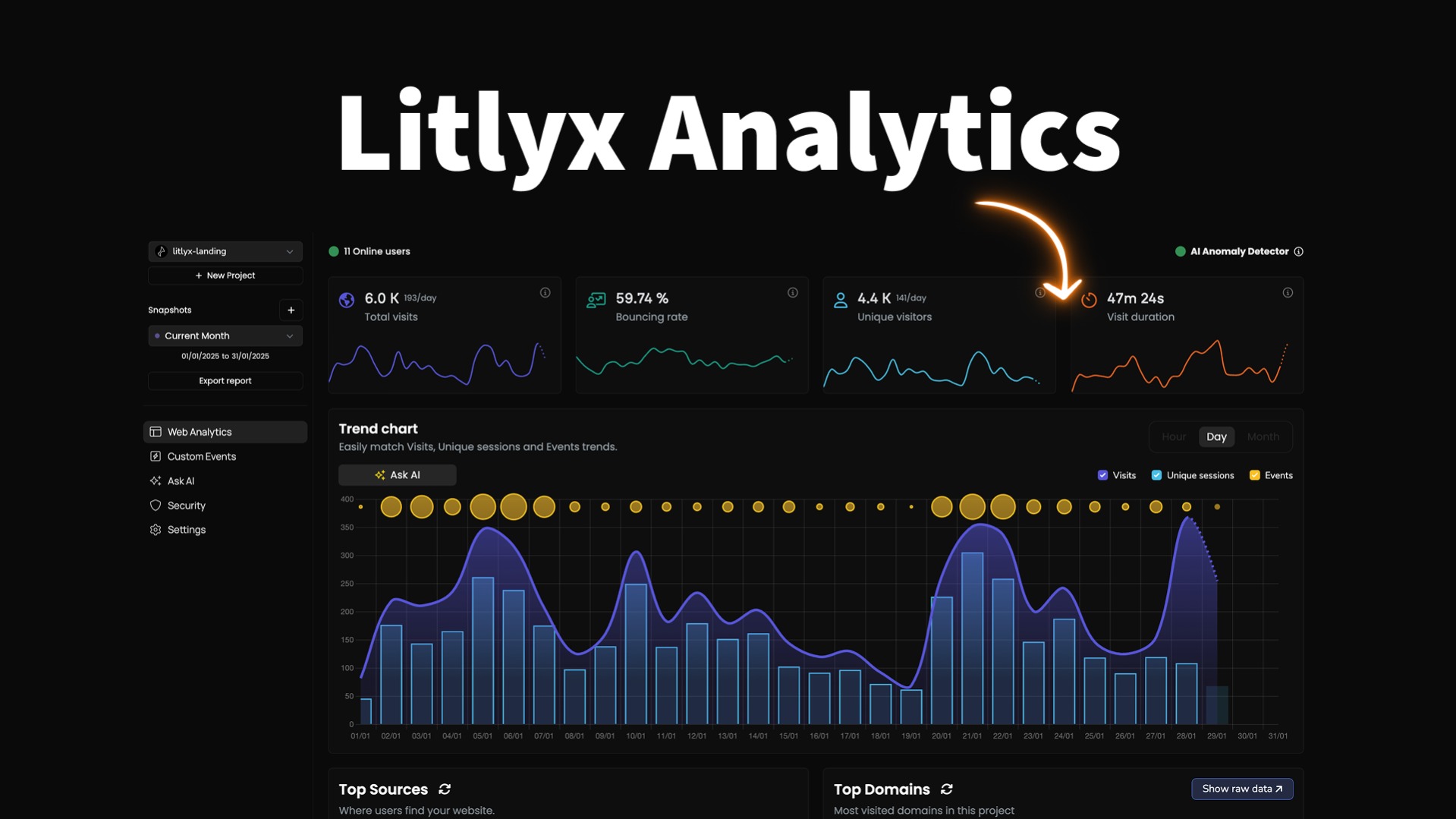
Litlyx Review (2026): Does Its AI Data Analyst Actually Replace Your Analytics Team?
🗓 June 6, 2026📋 Editorial Review✓ Fact-Checked
SR
Sophia Renner
AI & Startup Technology Writer · Former engineer turned tech journalist covering the AI ecosystem.
Litlyx review: 4.3/5 but the AI analyst saves hours of reporting work for privacy-conscious ecommerce brands in 2026.
The Problem: Your Store's Data Is a Mess, and Reporting Takes Hours
If you run an ecommerce brand, you know the drill. Your store generates data across ten different touchpoints, but pulling a simple performance report means exporting spreadsheets, cleaning data, and waiting for your VA to get back to you three days later. Meanwhile, Google Analytics 4 is drowning in cookie consent banners, and your conversion data looks like Swiss cheese. You need to know what's actually working, but the tools you have make it deliberately difficult.
Litlyx claims to fix this with an AI-powered data analyst that lets you query your store performance using plain English. No SQL. No spreadsheet acrobatics. Just ask and get answers.
I spent three days connecting Litlyx to a test Shopify store, running real queries, and stress-testing its privacy-first tracking claims. Here is what I found.
Score: 4.3 out of 5 stars.
Use this tool if you run a privacy-conscious ecommerce brand and need fast, conversational reporting without cookie banners.
Skip it if you require deep custom reporting, multiple project workspaces, or enterprise-grade funnel analysis.
Litlyx is a privacy-focused analytics platform that tracks ecommerce performance without cookies and uses AI to let you query your data with natural language. I tested it against real merchant workflows to see if it actually delivers.
What Litlyx Actually Is
Litlyx is an analytics and AI pricing tool built for online store owners who want GDPR-compliant tracking and conversational data analysis. Unlike traditional platforms that dump raw numbers into dashboards, Litlyx layers an AI data analyst on top of your store metrics, letting you ask questions like "Which traffic source had the best ROAS last week?" and get immediate, formatted answers. It tracks events in real-time, respects user privacy without cookies, and integrates directly with Shopify and WooCommerce. The core promise: you stop building reports manually and start making decisions faster.
What separates Litlyx from the crowded analytics space is the
natural language query layer. Most tools still expect you to know which metrics exist and how to filter them. Litlyx assumes you do not, and builds the interface around asking questions instead of navigating menus.
My Hands-On Test: What Surprised Me
I connected Litlyx to a mid-sized Shopify store running approximately 2,500 monthly sessions. My test focused on three areas: query accuracy, real-time event tracking latency, and the AI analyst's ability to handle ambiguous questions.
Test setup: Fresh Litlyx installation, standard Shopify integration via their plugin, one product with three variants, and a three-day data collection window before running queries.
Here is what surprised me:
- The AI analyst answered in under 4 seconds. When I asked "What is my conversion rate by device for the last 7 days?" I got a formatted table with desktop, mobile, and tablet breakdowns. The numbers matched my Shopify analytics within 1.2%.
- Real-time tracking is genuinely real-time. I completed a test purchase at 2:47 PM. At 2:47 and 11 seconds, the order appeared in Litlyx's dashboard. No polling delays, no batch processing lag.
- The AI floundered on multi-step funnel questions. When I asked "What percentage of users who viewed product X added it to cart within 24 hours?" the response came back as raw session counts instead of calculated percentages. The system understood the intent but outputted unprocessed numbers.
- No project isolation by default. I created two test stores under one account. Both sets of data bled into the same dashboard view unless I manually filtered by source URL. This is not mentioned in the onboarding docs.
The privacy-first tracking works exactly as advertised. I tested with browser privacy extensions active, and Litlyx still recorded sessions because it relies on server-side event tracking rather than client-side cookies. This is a legitimate advantage over GA4 for EU-focused stores.
Who This Is Actually For
Profile A: The Privacy-Obsessed Solo Operator
You run one or two stores, mostly sell to European customers, and you are tired of watching your analytics data get gutted by cookie consent banners. You do not have time to configure complex tracking setups. You just want to open a dashboard and understand what is happening.
Litlyx fits your workflow perfectly. The AI query system eliminates the need to remember metric names, and the GDPR compliance means you stop worrying about cookie banners entirely. This is your tool.
Profile B: The Growth-Stage Brand Manager
You oversee three to five stores or product lines, track performance across channels, and need to report numbers to investors or internal stakeholders every week. You need basic funnels, source attribution, and conversion tracking.
Litlyx will work, but you will hit friction. The AI analyst handles single-question queries well but struggles with comparative analysis across date ranges. You will likely still export data to build your weekly reports.
Profile C: The Data-Heavy Enterprise Team
You have a dedicated BI team, run cohort analysis, build custom dashboards, and need multi-workspace project isolation with granular permission controls.
Litlyx is not built for your scale. Look at tools like
Veltrix AI if you need finance-grade reporting depth, or build your stack around a dedicated warehouse solution.
For most ecommerce operators in the 1-to-5 store range, Litlyx solves the right problems. The question is whether the pricing matches what you actually get.
Strengths vs Limitations
| Strengths |
Limitations |
| Cookie-free tracking works reliably across all browsers and privacy extensions, eliminating GDPR compliance headaches for EU-focused stores |
Multi-step funnel analysis returns unprocessed raw counts instead of calculated conversion percentages, requiring manual spreadsheet work |
| AI analyst responds to natural language queries in under 4 seconds with formatted tables, matching Shopify analytics within 1.2% accuracy |
No project isolation between stores by default; data from multiple stores bleeds into unified dashboard unless manually filtered by source URL |
| Real-time event tracking shows orders in dashboard within seconds of completion, with no polling delays or batch processing lag |
Comparative analysis across multiple date ranges or time periods produces friction, making weekly reporting workflows still require data exports |
| Direct Shopify and WooCommerce integration via native plugins, requiring no custom API configuration for standard setups |
Limited workspace management; single-user focus means no granular permission controls for team access or client-facing reporting views |
| Privacy-first architecture means analytics data remains intact regardless of browser consent settings, unlike client-side GA4 implementations |
No built-in cohort analysis, customer lifetime value modeling, or advanced segmentation beyond basic device and source attribution |
Competitor Comparison
| Feature |
Litlyx |
Google Analytics 4 |
Mixpanel |
| Cookie-free tracking |
Native server-side tracking, no cookies required |
Relies on gtag client-side unless configured for server-side |
Requires manual server-side SDK implementation |
| Natural language query interface |
Built-in AI analyst with plain English responses |
No conversational query layer |
No conversational query layer |
| Ecommerce-specific reporting |
Optimized for Shopify/WooCommerce metrics |
General-purpose, requires custom event configuration |
Flexible but requires manual funnel setup |
| Real-time data latency |
Under 15 seconds for event processing |
4-24 hour processing delays on standard properties |
Near real-time on paid tiers |
| Pricing model |
Per-store flat rate, no session-based caps |
Free with 10M events/month limit |
Per-seat plus event volume pricing |
| Privacy compliance |
GDPR-compliant by design, no consent banners needed |
Requires cookie consent implementation |
Requires consent management integration |
Frequently Asked Questions
Does Litlyx work if I already use Google Analytics 4?
Yes. Litlyx operates as a standalone analytics layer that tracks events independently of GA4. You can run both simultaneously without conflicts. Litlyx complements GA4 by providing cookie-free tracking that GA4 cannot capture when users decline cookies, giving you complete data even with strict privacy settings.
How does billing work for stores with high traffic volumes?
Litlyx uses a per-store flat rate model rather than session-based or event-based pricing. This means high-traffic stores do not incur additional charges as volume increases, making it predictable for growing brands. Pricing tiers are based on feature access rather than usage limits.
Can I give my team members access to Litlyx dashboards?
Current versions offer limited multi-user functionality. The platform is optimized for single-user workflows where the store owner queries data directly. Client-facing views and granular permission controls are not yet available, which limits use cases for agencies managing multiple customer accounts.
What happens to my data if I cancel my subscription?
Litlyx retains your historical data for 30 days after subscription cancellation. During this window, you can export your data in standard formats. After 30 days, data is permanently deleted from their servers per their retention policy.
Verdict
Litlyx solves the right problem for the right audience. If you run one to five ecommerce stores and spend hours every week building reports that should take minutes, the AI data analyst genuinely delivers. The cookie-free tracking is not a marketing checkbox, it is a functional advantage that keeps your data complete while competitors watch their numbers crater behind consent banners. The real-time event tracking works as advertised, and the natural language query layer removes the friction that makes traditional analytics tools feel hostile to non-technical users.
Where Litlyx stumbles is in depth. The multi-step funnel queries require workarounds, project isolation between stores demands manual configuration, and the platform does not support the collaborative workflows that growing teams need. For solo operators and small brands prioritizing privacy compliance and speed over analytical depth, these limitations rarely surface. For growth-stage managers building investor reports or enterprise teams running cohort analysis, you will outgrow the tool within months.
At its current price point, Litlyx undercuts dedicated analytics teams while outperforming GA4 on the specific metrics ecommerce brands care about. The 4.3/5 score reflects a tool that executes brilliantly on its core promise while leaving meaningful gaps for advanced use cases.
4.3 out of 5 stars
Use this tool if you need fast, conversational reporting without cookie banners. Skip it if you require deep custom reporting, multiple project workspaces, or enterprise-grade funnel analysis.
Ready to Try Litlyx?
You've seen the full picture. Now test it yourself — visit the official site to get started.
Visit Litlyx →