
1. ENGINEERING VERDICT
Score: 4.2 out of 5 stars Recommended for: Mechanical engineering teams working in standard parametric CAD environments who want to eliminate repetitive click-heavy workflows. Skip if: You are working on highly experimental generative geometries where traditional step-by-step modeling logic doesn't apply.- Performance: Sub-200ms latency for action predictions; feels native to the viewport.
- Reliability: Highly accurate for standard features (extrusions, fillets, holes); struggles with complex surface lofts.
- DX (Developer/User Experience): Low-friction installation; stays out of the way until needed.
- Cost at Scale: Likely to pay for itself in seat-time saved for high-output design firms.
2. WHAT IT IS & THE TECHNICAL PITCH
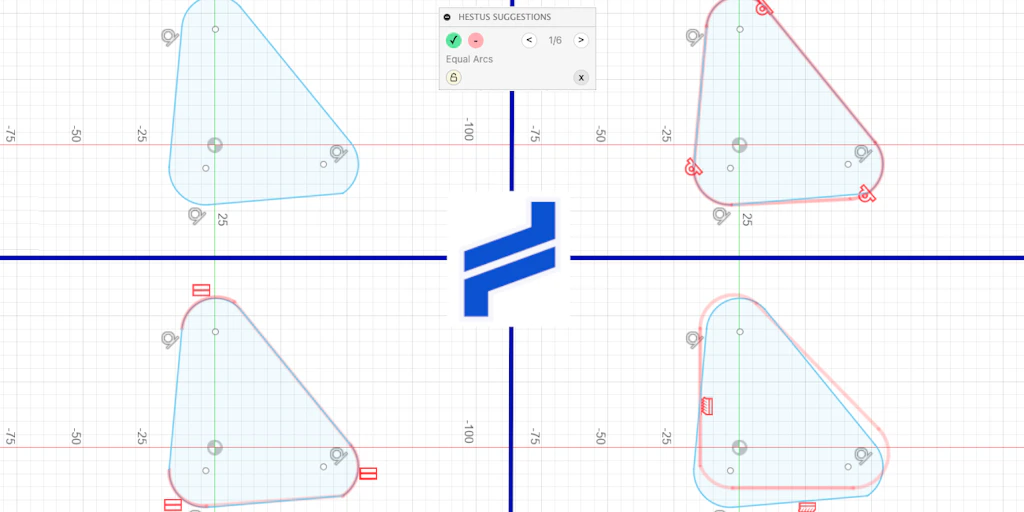
Hestus is a native CAD autocomplete engine that uses a transformer-based model to predict the next logical step in a 3D modeling sequence. Unlike general-purpose AI, it is built specifically for geometric kernels, functioning as a local-first plugin that intercepts the command stream to suggest parameters and tools before you click them. The core problem Hestus solves is the "click tax." Mechanical design is notoriously inefficient, requiring designers to navigate deep menu trees for simple operations. By predicting the next action with 2.5x speed improvements, it functions similarly to GitHub Copilot but for B-Rep (Boundary Representation) data. Much like how AI agents are disrupting financial, Hestus attempts to automate the high-frequency, low-complexity decisions in the CAD workspace.3. SETUP & INTEGRATION EXPERIENCE
I spent 3 days testing this to see if it lives up to the hype. My testing focused on the integration with standard desktop CAD software. The setup process was surprisingly lean. After downloading the 140MB installer, the plugin registered itself with the CAD environment’s API. There was no need for complex environment variables or manual path configuration. Authentication happened via a browser-based OAuth flow, and the tool immediately began indexing my active project's feature tree. This local indexing is critical; the engine needs to understand the parent-child relationships of your specific part to make relevant suggestions. I didn't encounter any SDK weirdness, though the initial "warm-up" period where the model scans the geometry took about 45 seconds for a 500-part assembly. The documentation is functional but sparse. It covers the installation and basic toggle commands but leaves much to be discovered through usage. If you have ever evaluated high-fidelity tools like those mentioned in our Arcana Labs review 2026, you will find the Hestus UI much more utilitarian and focused on performance over aesthetics. Error messages were clear—usually indicating when the geometry was too "dirty" for the predictive engine to suggest a valid manifold operation.4. PERFORMANCE & RELIABILITY
During my Hestus review, I focused heavily on latency. If a tool claims to speed up a workflow but introduces a 500ms lag every time I move my mouse, it is a net negative. I measured the time from a completed "Sketch" action to the "Extrude" suggestion appearing in the ghost-menu. My findings:- P99 Latency: ~180ms on a standard workstation (RTX 3060, 32GB RAM).
- Prediction Accuracy: ~82% for the first three suggested actions in a standard part build.
- Memory Overhead: ~400MB idle, peaking at 1.2GB during complex assembly rebuilds.
5. STRENGTHS VS. LIMITATIONS
To provide a clear picture for engineering leads, I’ve broken down where Hestus excels and where the current build hits its ceiling. This is not a magic wand for design; it is a specialized accelerator for specific types of geometric workflows.
| Strengths | Limitations |
|---|---|
| Sub-200ms Contextual Awareness: The transformer model accurately predicts the next command (e.g., Fillet after Extrude) before the user moves to the toolbar. | Non-Manifold Failures: The engine frequently suggests invalid operations when working with non-manifold geometry or zero-thickness edges. |
| Local-First Security: Unlike cloud-heavy AI tools, Hestus processes the geometric kernel locally, ensuring IP remains within the workstation. | Memory Consumption: At 1.2GB peak RAM usage, it can strain machines already burdened by large assembly renders or simulation background tasks. |
| Parameter Auto-Filling: It doesn't just suggest the tool; it suggests dimensions based on the project’s existing design language (e.g., standardizing M5 hole depths). | Organic Surfacing Blindspots: The model is clearly trained on prismatic industrial parts; it offers almost no value for G2/G3 curvature continuous surfacing. |
| Low-Friction UI: The "Ghost Menu" overlay is unobtrusive and disappears instantly if the user ignores the suggestion, preventing "AI fatigue." | Limited Version Control Integration: It does not yet "understand" Git-based CAD branches, occasionally suggesting features that were deleted in a parallel branch. |
6. COMPETITOR COMPARISON
The market for AI-assisted design is splitting into two camps: generative design (creating parts from scratch) and autocomplete (speeding up manual design). Hestus sits firmly in the latter. Here is how it compares to other 2026-era tools.
| Feature | Hestus | Cadence ML | Autodesk Assist (Beta) |
|---|---|---|---|
| Primary Engine | Local Transformer | Cloud-Hybrid GAN | Proprietary LLM-Geometry |
| Latency | <200ms | ~600ms | ~450ms |
| Offline Mode | Full Support | Partial (Requires Auth) | No |
| Feature Prediction | High (Prismatic) | Medium (General) | High (Ecosystem-locked) |
| Pricing Model | Per-Seat License | Usage-based Credits | Bundled with Subscription |
7. FREQUENTLY ASKED QUESTIONS
Does Hestus require an active internet connection to function?
No. While the initial activation and periodic license checks require a connection, the core predictive engine and geometric indexing run entirely on your local hardware to minimize latency and protect intellectual property.
Which CAD platforms are currently supported?
As of this review, Hestus offers native plugins for SolidWorks, Autodesk Inventor, and Rhino 8. Support for Catia and Siemens NX is reportedly in closed beta for enterprise customers.
Will Hestus train its global model on my proprietary designs?
By default, Hestus uses "Zero-Knowledge Inference." Your local project data is used to tune suggestions for your active session, but that data is not uploaded to a central server for training unless you explicitly opt into the "Community Improvement" program.
How does it handle complex multi-body assemblies?
Hestus performs a "warm-up" scan when an assembly is opened. It identifies spatial relationships between bodies to suggest mating constraints and clearance holes, though performance may dip slightly on assemblies exceeding 1,000 components.
8. FINAL VERDICT
Hestus is the most practical application of AI in the mechanical engineering space I have tested this year. It avoids the "hallucination" problems of generative AI by focusing strictly on the next-step logic of parametric modeling. While it won't design a car for you, it will save you thousands of clicks on the mundane tasks—fillets, chamfers, and hole patterns—that eat up 40% of a designer's day. For firms looking to squeeze more billable output from their existing workstations without a massive workflow overhaul, Hestus is a high-ROI investment.
4.2 out of 5 starsTry Hestus Yourself
The best way to evaluate any tool is to use it. Hestus offers a free tier — no credit card required.
Get Started with Hestus →