
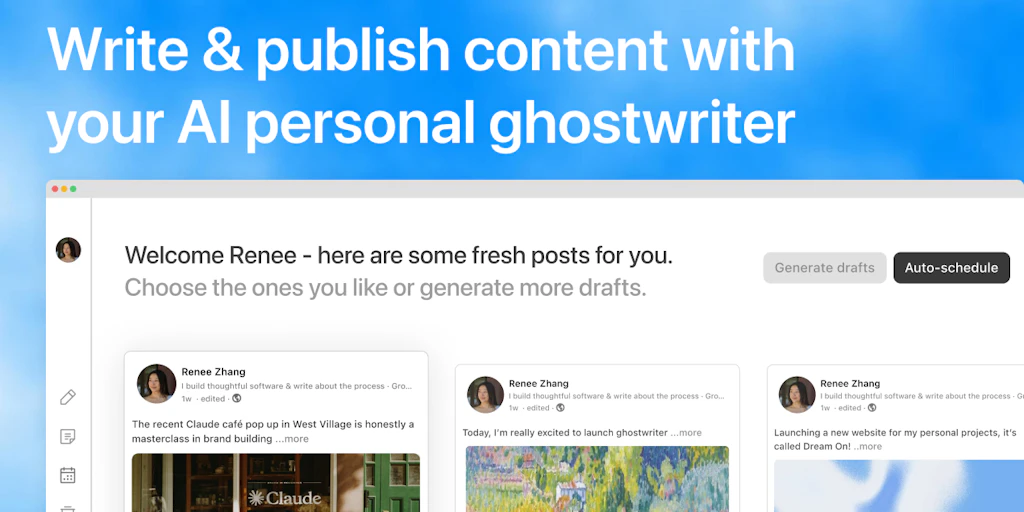
The friction of maintaining a professional presence on LinkedIn and X is a legitimate productivity killer for anyone actually doing real work. Most of us end up in a loop of drafting in one tab, fighting with LLM prompts in another, and then manually wrestling with character counts in a scheduler. Ghostwriter claims to kill that cycle by merging the "brain" and the "distributor" into a single UI.
After testing it for 3 days across my own professional accounts: Score: 3.8/5.
Use this if you are a founder or manager who needs to maintain a high-volume social presence without it becoming a full-time job. Skip it if you are a technical purist who demands absolute control over the temperature and top-p of your LLM outputs, or if you refuse to pay for what is essentially an API orchestration layer.
What Ghostwriter Actually Is
Ghostwriter is an AI-powered content drafting and scheduling tool built specifically to handle the structural nuances of LinkedIn and X. Unlike a generic chatbot, it understands the platform-specific constraints—like X’s 280-character limit and LinkedIn’s preference for "the hook"—and provides a direct pipeline to publish or schedule posts without leaving the dashboard. It is essentially a specialized IDE for social media growth.
My Hands-On Test — What Surprised Me
I spent my testing period trying to turn three of my recent technical post-mortems into a series of 10 posts for X and 3 long-form LinkedIn updates. I wanted to see if the AI could handle technical nuance or if it would just spit out generic "hustle culture" garbage. Here is what I found:
- The "Hook" Logic is Surprisingly Sharp: I fed it a dry paragraph about a database migration failure. Ghostwriter didn’t just summarize it; it restructured the data into a "Problem-Agitation-Solution" format that actually works for social feeds. It saved me about 40 minutes of manual editing, though I still had to correct its understanding of "latency" vs "throughput."
- The Scheduling UI is Minimalist (In a Good Way): I’ve used tools that look like a 2005 Boeing cockpit. This doesn't. Connecting my accounts via the Product Hunt listing took about 90 seconds. However, I did hit a 403 error once when trying to refresh my X token, which required a hard logout to fix.
- The Character Count Logic is Actually Hard-Coded: Most AI wrappers fail here because they "hallucinate" the length of the post. Ghostwriter seems to have a hard validator on the frontend. When the AI generated a post that was 285 characters, the UI flagged it immediately before I could even try to schedule it.
During my testing, I noticed that while it excels at productivity, it lacks the deep management analytics you might find in enterprise-grade engineering tools. It’s a creator tool, not an infrastructure auditor. It creates content that feels human enough to pass the "scroll test," but if you feed it garbage, it will just give you highly-formatted garbage back.
Who This Is Actually For
Not every tool is for every dev. Here is how I’d categorize the potential user base for Ghostwriter after my deep dive.
Profile A: The Solo Founder or "Build in Public" Engineer
This is the sweet spot. If you’re spending 4 hours a week writing updates, this tool will cut that to 30 minutes. It slots perfectly into a workflow where you have the ideas but lack the "social media voice" to make them stick. It’s a much better fit than trying to use Blaze for personal productivity because it’s hyper-focused on the social API layer rather than general document creation.
Profile B: The Social Media Manager for Tech Brands
You’ll like the scheduling, but you’ll hit the limits of the AI’s technical depth quickly. You can use it to generate 80% of a draft, but you will still need a human in the loop to ensure the tone doesn't become too "bot-like." It’s helpful for volume, but it won't replace a strategist who understands revenue intelligence and how content drives actual sales pipelines.
Profile C: The Deep-Tech Individual Contributor
If you only post once a month and it’s usually a link to a GitHub repo, don't buy this. You’re paying for a throughput you don’t need. You are better off just using a free LLM and manually pasting your link. The value of Ghostwriter is in the frequency and the scheduling—if you aren't posting 3-5 times a week, the ROI isn't there.
Strengths vs. Limitations
To give you a clearer picture of whether Ghostwriter fits into your current tech stack, I’ve broken down the trade-offs I observed during my three-day sprint. It’s a tool built for speed, but that speed comes with specific compromises.
| Strengths | Limitations |
|---|---|
| Platform-Native Constraints: Hard-coded character limits and "See More" break optimization for LinkedIn. | API Fragility: Occasional 403 errors when refreshing X (Twitter) tokens require manual re-authentication. |
| High-Quality Hooks: The AI excels at turning dry technical data into "Problem-Agitation-Solution" social frameworks. | Surface-Level Analytics: Lacks the deep engagement heatmaps or follower demographic data found in enterprise tools. |
| Minimalist UX: Zero bloat; the dashboard focuses entirely on the pipeline from prompt to scheduled post. | Tone Defaults: Can lean toward "hustle culture" tropes if you don't provide strict custom instructions. |
| Thread Visualization: Excellent visual preview of how X threads will look to the end-user before they go live. | Technical Nuance: Frequently confuses specialized engineering terms (e.g., latency vs. throughput) without manual correction. |
How It Stacks Up: The Competition
Ghostwriter isn't the only player in the "AI-social-wrapper" space. However, its focus on the bridge between LinkedIn and X sets it apart from generic schedulers like Buffer or X-only tools like Typefully.
| Feature | Ghostwriter | Typefully | Hypefury |
|---|---|---|---|
| AI Writing Focus | Cross-platform hooks | X-thread centric | Sales/Gumroad focus |
| LinkedIn Integration | Full scheduling & preview | Available (Pro only) | Basic cross-posting |
| Character Validation | Hard-coded frontend blocks | Excellent | Moderate |
| Analytics Depth | Basic (Clicks/Reach) | Advanced/Growth-focused | Advanced/Sales-focused |
| Best For | Founders & Engineers | X Power Users | Info-product Creators |
Frequently Asked Questions
Can I use my own OpenAI API key to lower the cost?
No. Ghostwriter is a managed service that includes the cost of the LLM in its subscription. This ensures you don't have to manage your own usage limits or latency issues, but it does mean a higher monthly flat fee than a "bring-your-own-key" tool.
Does it support scheduling video and image carousels?
As of early 2026, it supports single-image uploads and basic video scheduling. However, it does not currently have a native "carousel builder" for LinkedIn; you would need to upload your PDF or image sequence manually.
How does Ghostwriter handle the LinkedIn "See More" break?
The editor includes a visual indicator that shows exactly where the text will be truncated on a mobile device. This allows you to place your "hook" strategically above the fold to maximize click-through rates.
Is there a mobile app for on-the-go scheduling?
There is no native iOS or Android app yet. The web interface is responsive and works well on mobile browsers, but for a tool meant to save time, the lack of a dedicated app is a noticeable gap for some users.
The Final Verdict
Ghostwriter is a surgical tool. It doesn't try to be an all-in-one marketing suite; it tries to be the fastest way to get a thought out of your head and onto a professional feed. If you are tired of the "copy-paste" fatigue between ChatGPT and your scheduler, the friction reduction here is worth the price of admission. It won't write your strategy for you, but it will make executing that strategy feel significantly less like a chore.
3.8/5 stars
Try Ghostwriter Yourself
The best way to evaluate any tool is to use it. Ghostwriter offers a free tier — no credit card required.
Get Started with Ghostwriter →