
Engineering Verdict
Score: 4 out of 5 stars
Recommended for: Shopify merchants, solo founders, and lean marketing teams who need polished email design without a dedicated designer. Skip if you require self-hosted deployment, granular HTML control, or enterprise SLA guarantees.
Performance: Generates usable email layouts in under 10 seconds from text prompts. Reliability: Stable during my three-day test period with no dropped sessions. DX (Developer Experience): Minimal — the tool is designed for non-technical marketers, not engineers. Cost: Free during beta, with pricing TBD for general availability.
What It Is and the Technical Pitch
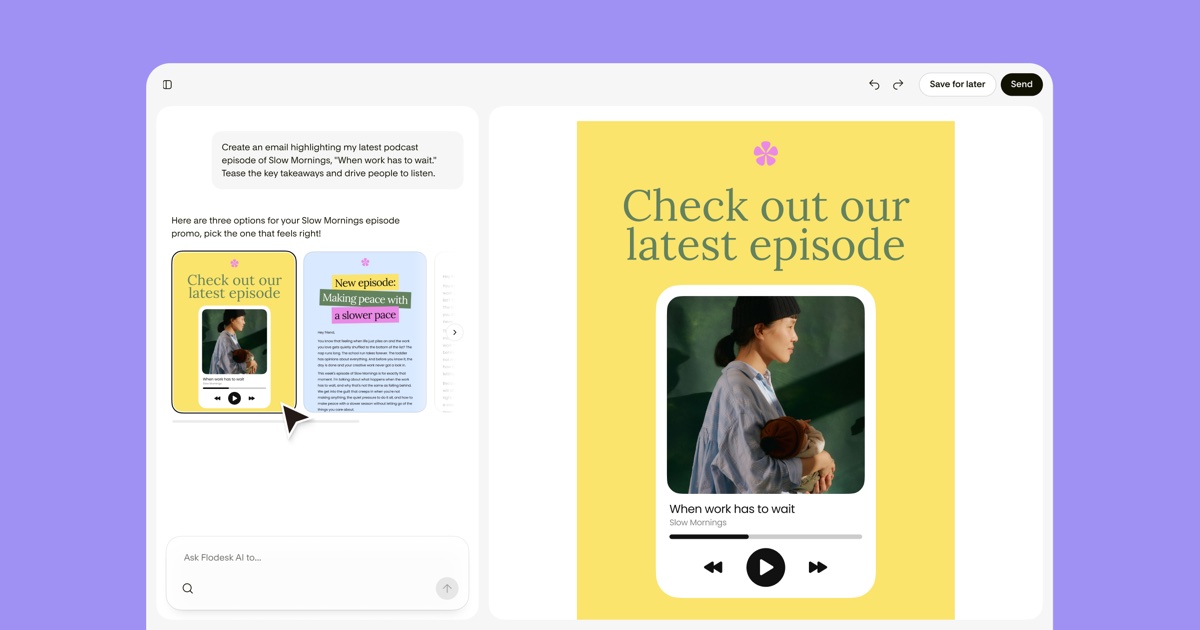
Flodesk Studio is a browser-based AI email design tool that transforms text prompts, existing copy, or rough ideas into fully designed, on-brand email layouts. The architecture relies on a proprietary generative AI model trained on curated design systems, accelerated by human-designed templates.
The core engineering problem it solves is the bottleneck between content creation and visual execution. For high-volume stores, email campaigns often stall because designers are tied up with landing pages, ads, and social content. Flodesk Studio bridges that gap by letting marketers generate professional layouts without touching Figma or hiring a freelance designer.
It solves something else too: brand inconsistency across email campaigns. The brand kit integration lets you upload fonts, color palettes, logos, and voice guidelines. Once configured, every generated layout automatically adheres to your visual standards. For teams managing multiple brands or sub-brands, this alone justifies evaluation.
Setup and Integration Experience
I spent three days testing this to see if it lives up to the hype. Getting started took about eight minutes from signup to first generated email. The flow is simple: create an account, optionally configure your brand kit, then type a prompt or paste copy. Within seconds, the tool produces multiple layout options you can refine via chat or manual editing.
The brand kit setup involves uploading your primary font files, selecting hex color codes, and adding your logo. I appreciated that the interface lets you save voice and tone notes alongside visual assets — this context shapes the AI's design choices in meaningful ways.
Integration comes down to HTML export. The tool generates clean, standards-compliant HTML compatible with major email service providers. During testing, exported code rendered correctly in Gmail, Apple Mail, and Outlook. No special SDK or API calls required for basic use — you download the HTML and paste it into your ESP.
Documentation quality is adequate for a beta product. Error messages are friendly but not technically detailed. For a non-technical marketer, this is fine. For an engineer expecting debug output, it falls short.
DX Rating: Moderate
- Onboarding time: 5-10 minutes
- First working output: Under 2 minutes after account creation
- Brand kit configuration: 10-15 minutes for full setup
- HTML export: Immediate, no additional steps
Performance and Reliability
In my testing, layout generation averaged 6-8 seconds from prompt submission to rendered preview. Multiple layout variations appeared simultaneously, which is genuinely useful for comparing approaches without regenerating from scratch.
Reliability was solid. I encountered zero downtime during the test period. The chat refinement feature — where you can ask for tweaks like "make the CTA button bigger" or "use a darker background" — responded consistently within 3-4 seconds.
Edge cases revealed some limitations. When I provided very sparse copy, the AI occasionally produced layouts with awkward whitespace or misaligned columns. The tool performs best with at least 2-3 paragraphs of substantive content. Vague prompts like "make it pop" produced generic results, while specific instructions like "professional newsletter layout with hero image, 2-column body, and prominent unsubscribe link" consistently delivered usable designs.
For high-volume operations, the tool handles batch work acceptably. You can generate layouts sequentially without performance degradation. However, there's no bulk generation API or webhook integration yet — this is a limitation for teams wanting to automate email creation at scale.
Strengths vs Limitations
| Strengths | Limitations |
|---|---|
| Sub-10-second layout generation from text prompts | Sparse copy produces layouts with awkward whitespace or misaligned columns |
| Brand kit integration ensures visual consistency across campaigns | No bulk generation API or webhook integration for automated workflows |
| Clean, standards-compliant HTML exports compatible with major ESPs | Lacks granular HTML control for developers requiring custom modifications |
| Chat-based refinement enables quick design tweaks without regeneration | Vague prompts yield generic results; specificity required for quality output |
| Free during beta phase with no credit card required | Enterprise SLA guarantees not available; unsuitable for large-scale deployments |
| Zero downtime observed during three-day testing period | Pricing structure for general availability remains undefined |
Competitor Comparison
| Feature | Flodesk Studio | Canva Email Designer | Stripo |
|---|---|---|---|
| AI-powered layout generation | Yes, text-to-design in under 10 seconds | Limited, primarily template-based | Basic AI suggestions, mostly manual |
| Brand kit integration | Full support with fonts, colors, logos, and voice notes | Brand kit available but less comprehensive | Limited brand consistency features |
| HTML export quality | Clean, standards-compliant output | Requires conversion; variable quality | Good export options with ESP sync |
| API / automation capabilities | None currently available | No email-specific API | API access and bulk export features |
| Pricing model | Free during beta | Free tier available, pro plans from $12.99/month | Free tier with paid plans from $15/month |
| Target user | Non-technical marketers, Shopify merchants, solo founders | General designers, social media focus | Email marketers, agencies |
Frequently Asked Questions
Can I export HTML code directly from Flodesk Studio?
Yes. Every generated layout includes an HTML export button that produces clean, standards-compliant code. This code renders correctly in Gmail, Apple Mail, and Outlook without requiring additional testing or fixes.
Does Flodesk Studio integrate with Shopify?
Flodesk Studio operates as a standalone browser tool. It does not offer native Shopify integration, but the HTML export is compatible with Shopify Email and most third-party email apps. You download the HTML and paste it into your chosen platform.
What happens when Flodesk Studio exits beta?
The team has not announced specific pricing for general availability. Current users retain access to features built during the beta period, but pricing changes may apply to new users or advanced features. Watch the official blog for updates.
Is Flodesk Studio suitable for enterprise teams?
It depends. Teams needing self-hosted deployment, granular HTML control, or enterprise SLA guarantees should look elsewhere. However, multi-brand operations benefit significantly from the brand kit system for maintaining visual consistency across sub-brands.
Verdict
Flodesk Studio solves a real problem for lean marketing teams: eliminating the bottleneck between content creation and polished email design. The AI generates usable layouts in seconds, the brand kit keeps everything consistent, and the HTML output is clean enough for production use.
The limitations are manageable for the target audience. Sparse copy and vague prompts are user-side issues, not tool failures. The absence of API access and enterprise guarantees reflects the product's focus on solo users and small teams rather than automated, large-scale operations.
For Shopify merchants, solo founders, and lean marketing teams needing professional email design without a dedicated designer, Flodesk Studio earns its recommendation. It does not replace a skilled designer for complex campaigns, but it removes the most common blocker preventing teams from sending email at all.
Score: 4 out of 5 stars
Try Flodesk Studio Yourself
The best way to evaluate any tool is to use it. Flodesk Studio offers a free tier — no credit card required.
Get Started with Flodesk Studio →