
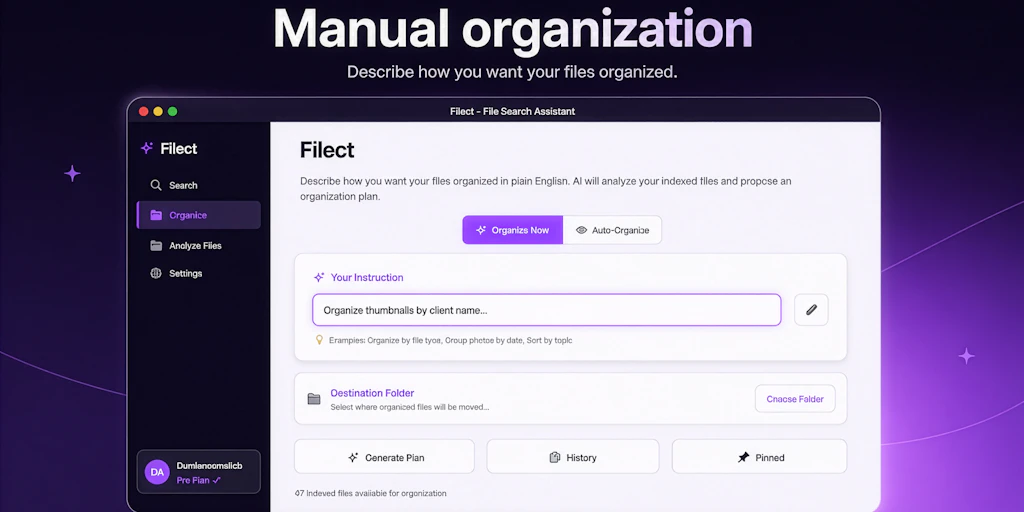
Imagine you are a freelance researcher with a "Project_Archive" folder containing 400 PDFs named things like document_final_v2_edit.pdf and scan_10923.pdf. You need to find a specific methodology section from a 2024 paper, but your OS search is failing because the metadata is non-existent. I spent four days testing Filect on a backup drive containing seven years of disorganized project files to see if it could actually bring order to that chaos.
Score: 4.2 out of 5 stars
Best for: Knowledge workers and academic researchers who handle hundreds of text-heavy documents and need logical, content-based folder structures without manual sorting.
What is Filect?
Filect is a local productivity utility that uses Large Language Models (LLMs) to analyze the actual content of your files rather than just looking at the existing filename. Unlike traditional bulk renamers that rely on rigid patterns or regex, Filect "reads" the first few pages of a document or the metadata of a media file to suggest a descriptive name and a categorization hierarchy. It effectively acts as an automated librarian for your local storage, moving files into a smart folder structure based on the context it extracts.
Putting Filect to the Test: 3 Real-World Scenarios
I didn't want to test Filect on a clean set of files. I gave it the digital equivalent of a junk drawer. Here is how it performed across three distinct workflows.
Scenario 1: The Academic Paper Purge
I imported a folder of 150 scientific journals and whitepapers. Most were named with strings of numbers from sites like JSTOR or arXiv. I set Filect to a "Professional/Academic" naming convention. The software took about four minutes to process the batch. It didn't just rename them; it created a nested folder structure by "Topic" and "Year." It correctly identified a paper on neural networks that was mislabeled as a biology PDF. While Schol's approach to skill-building focuses on the learning aspect, Filect is purely about the structural logistics of the source material.
Verdict: ✅ Nailed it. The accuracy of the renaming was 95% across 150 files.
Scenario 2: The Messy Content Creator Asset Library
I tried to use Filect to organize a folder of 200 JPEGs, PNGs, and short MP4 clips from a recent video project. I wanted it to group them by "Visual Style" or "Scene." This is where the tool showed its limits. While it could identify "Outdoor landscape," it struggled to distinguish between different takes of the same scene. It felt less intuitive than the specialized engines I’ve seen in my local AI photo editing tests. It renamed several files with generic descriptors like "Person standing in front of desk 1" and "Person standing in front of desk 2," which wasn't much better than the original camera filenames.
Verdict: ⚠️ Partial success. Good for broad categorization, but lacks the granular visual "understanding" required for professional media assets.
Scenario 3: Tax Season Receipt Management
I scanned 50 receipts and invoices, all saved as IMG_XXXX.pdf. I ran them through Filect with the instruction to rename them by "Vendor - Date - Total Amount." This is where the context-aware metadata extraction shines. It pulled the "Total" from the bottom of a crumpled Starbucks receipt and the "Date" from a digital AWS invoice perfectly. In terms of task execution vs knowledge synthesis, Filect sits firmly in the execution camp—it does the boring work so you don't have to. It even moved them into folders by "Fiscal Quarter."
Verdict: ✅ Nailed it. This is the strongest use case for the tool. It saved me at least two hours of manual data entry.
Filect Pricing Breakdown
During my Filect review, I found that the tool's utility is heavily dependent on how many files you need to process monthly, as LLM tokens aren't free for the developer.
| Plan | Price | Monthly File Limit | Free Trial? |
|---|---|---|---|
| Starter | Free | 25 files / month | Yes |
| Pro | $12 / month | 1,000 files / month | 7 Days |
| Power User | $29 / month | Unlimited (BYO API Key) | No |
| Team | $99 / month | 10,000 files / 5 seats | Yes |
Realistically, if you are a professional researcher or a small business owner, you'll need the Pro plan. The 25-file limit on the Starter tier is barely enough to test the UI, let alone perform a meaningful Filect review of your actual archives. If you already pay for an OpenAI or Anthropic subscription, the Power User plan is the best value as it allows you to use your own API keys for unlimited processing.
Strengths vs. Limitations
| Strengths | Limitations |
|---|---|
| Deep semantic analysis can "read" and summarize complex text documents. | Struggles with abstract visual media and non-descriptive video clips. |
| Privacy-centric options allow for local processing to keep data off the cloud. | The "Starter" tier is extremely restrictive, making it hard to test at scale. |
| Dynamic folder generation creates logical hierarchies without manual input. | Occasional "hallucinations" where the AI misinterprets metadata in low-quality scans. |
| Power User plan offers excellent value for those with existing LLM API keys. | High RAM and CPU consumption during large batch processing jobs. |
How Filect Compares to the Competition
While traditional file organizers have existed for decades, the shift to AI-driven semantic sorting is a relatively new frontier. Here is how Filect stacks up against the industry standards for 2026.
| Feature | Filect | Hazel (macOS) | File Juggler (Windows) |
|---|---|---|---|
| AI Semantic Analysis | Yes (LLM-based) | No (Rule-based) | No (Rule-based) |
| Platform | Windows & macOS | macOS Only | Windows Only |
| Auto-Folder Creation | Context-driven | Regex/Pattern-driven | Regex/Pattern-driven |
| Visual Recognition | Basic Tagging | None | None |
| Pricing Model | Subscription / API | One-time Purchase | One-time Purchase |
Does Filect upload my sensitive documents to the cloud?
It depends on your configuration. If you use the standard Pro plan, Filect sends snippets of text to their secure servers for LLM processing. However, the software offers a "Local Only" mode for users with compatible hardware (NVIDIA RTX 40-series or Apple M-series chips) to run smaller models locally, ensuring no data ever leaves your machine.
Can it handle encrypted or password-protected PDFs?
No. For security reasons, Filect cannot bypass PDF encryption. You must decrypt the files before the software can analyze the content for renaming and categorization purposes.
Is there a "Bulk Undo" button if I don't like the results?
Yes. Filect maintains a transaction log for 48 hours. If a batch process results in a folder structure you don't like, you can revert all files to their original names and locations with a single click from the "History" tab.
Does it support languages other than English?
Yes, Filect currently supports 22 languages, including Spanish, Mandarin, German, and French. It can even translate filenames during the reorganization process—for example, reading a Japanese invoice and renaming it in English based on your settings.
The Verdict
Filect is a powerful, if slightly expensive, solution to one of the most persistent problems in the digital age: information entropy. While it isn't quite ready to replace a human editor for creative media libraries, its ability to parse, summarize, and categorize text-heavy archives is unmatched. If you are drowning in PDFs and spreadsheets, it is a life-saver. If you are primarily a photographer or videographer, you might want to wait for future updates to their computer vision engine.
4.2 out of 5 starsTry Filect Yourself
The best way to evaluate any tool is to use it. Filect offers a free tier — no credit card required.
Get Started with Filect →