
1. THE PROBLEM & THE VERDICT
The industry is drowning in "flaky" tests because we are still trying to map human intent to brittle DOM selectors that change every time a developer sneezes near a CSS file. We spend more time fixing xpath identifiers and data-testid attributes than we do actually shipping features, leading to a QA bottleneck that kills deployment velocity.
After testing it for 5 days across a React Native mobile build and a complex Next.js web dashboard: Score: 3.8/5.
Use this if you are tired of maintaining thousands of lines of Playwright or Appium code and your UI changes faster than your documentation. Skip it if your application requires sub-second test execution or if you are testing data-heavy internal grids where visual changes are negligible but data integrity is everything.
2. WHAT DOCKET ACTUALLY IS
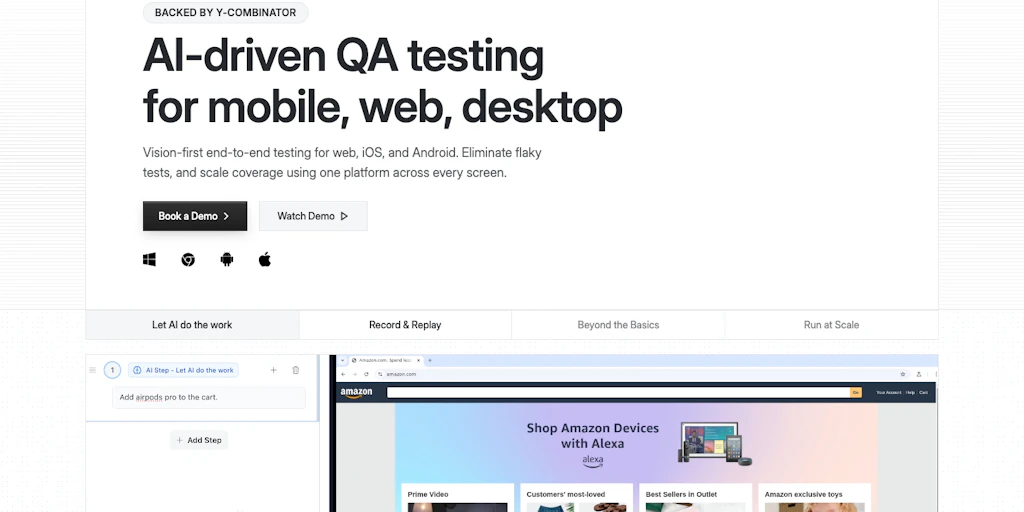
Docket is a vision-first automated QA platform that ignores the underlying code structure to interact with applications exactly like a human would. Instead of hunting for IDs, it uses trained AI models to "see" buttons, inputs, and icons across both web and mobile environments, theoretically eliminating the brittle nature of traditional script-based automation.
While most tools claim to be "AI-powered" by just wrapping GPT-4 around a Selenium script, Docket actually operates on the visual layer. It doesn't care if your button is a <div>, a <button>, or a <canvas> element; if it looks like a "Submit" button, Docket finds it. This makes it one of the few tools that can jump between a mobile app and a web browser in the same test flow without rewriting the entire logic. It’s a similar shift in philosophy to what we saw in the Kodezi approach to code correction, where the focus moves from syntax to intent.
3. MY HANDS-ON TEST — WHAT SURPRISED ME
I spent my testing window trying to break Docket using a legacy e-commerce platform that has three different versions of the same checkout button depending on the screen width. Usually, this is a nightmare for automated scripts. Here is what I discovered during my deep dive:
- The "Human" Logic is Scarily Accurate: I pointed Docket at a mobile login screen where the "Sign In" button was partially obscured by a cookie banner. A traditional script would have clicked the hidden element and failed. Docket paused, identified the "X" on the banner, cleared it, and then proceeded to log in. It didn't need me to tell it the banner existed; it just saw it as an obstacle.
- The Latency is Real: Vision-based execution is significantly slower than DOM-based testing. In my tests, a standard login flow took 14 seconds on Docket compared to 2.5 seconds on Playwright. The AI has to "look," process the frame, and decide on the next move. If you have a CI/CD pipeline that triggers on every commit, this delay is going to annoy your developers.
- Dynamic Content Causes Hallucinations: I tried testing a dashboard with live-updating stock tickers. Docket got confused by the constant visual flickering of the red and green price changes, occasionally misidentifying a "Sell" button because the background color shifted rapidly. It’s clear that "vision-first" struggles when the vision is too noisy.
I also noticed that setting up cross-platform flows was surprisingly painless. Linking a web-based admin panel action to a mobile app notification check didn't require two different frameworks. This kind of cross-functional automation reminds me of how Scalestack attempts to unify disparate data silos, though Docket is focused strictly on the UI interaction layer. However, I did hit a wall when trying to test specific API response headers; because Docket is vision-first, it basically ignores the network tab unless you specifically point it there, which feels like a missed opportunity for a "complete" QA tool.
4. WHO THIS IS ACTUALLY FOR (3 User Profiles)
Profile A: The Rapid-Iteration Startup
If your UI is changing every week and you don't have a dedicated QA department, Docket is a lifesaver. You can record a flow once, and even if your frontend team switches from Tailwind to Bootstrap overnight, the tests will likely still pass. It slots perfectly into a workflow where "done" is better than "perfectly scripted."
Profile B: The Cross-Platform Product Manager
This is the "might work" user. If you need to ensure that the user experience is identical on iOS, Android, and Web, Docket provides a unified view that traditional tools can't match. However, you will hit limitations if you need to test deep-link integrations or low-level hardware interactions like biometrics, which still feel clunky in this vision-first world. You might find yourself needing a more specialized tool like Zyphe if your testing involves heavy security or identity verification layers that vision AI can't easily bypass.
Profile C: The High-Performance Core Engineer
Do NOT use this if you are building a high-frequency trading platform, a complex SaaS grid (like Airtable), or anything where performance is measured in milliseconds. You will find the 10-15 second execution times per test case infuriating. Stick to Playwright or Vitest for your unit and integration levels; Docket is a specialized tool for end-to-end visual validation, not a replacement for your entire testing stack.
5. PRICING & ONBOARDING: THE HIDDEN COST OF VISION
Onboarding with Docket is deceptively simple. Unlike Playwright, where your first hour is spent configuring node_modules and browser binaries, Docket is a cloud-native recorder. You point it at a URL or upload an IPA/APK file, and you start "teaching" the model by performing the actions yourself. The initial learning curve is flat, which is refreshing for teams without dedicated SDETs.
However, the pricing model reflects the heavy GPU compute required for real-time computer vision. While traditional tools charge by the seat or parallel runner, Docket uses a "Visual Credit" system. Every time the AI has to "look" at a screen to make a decision, it consumes credits. For a simple landing page, this is negligible. For a complex, multi-step fintech application with 50+ screens, your monthly bill can scale faster than your infrastructure costs. It is a premium tool for a premium problem.
6. STRENGTHS VS. LIMITATIONS
To understand if Docket fits your stack, you have to weigh its "human-like" intuition against its technical overhead. Here is the breakdown of the trade-offs:
| Strengths | Limitations |
|---|---|
| Zero-Selector Maintenance: Tests don't break when CSS classes, IDs, or DOM structures change. | High Execution Latency: Visual processing adds 5-15 seconds of overhead per test case. |
| Unified Cross-Platform Logic: Use the same test flow for a React web app and a Flutter mobile app. | Network Blindness: Cannot natively validate API status codes or response headers without visual cues. |
| Intelligent Obstacle Handling: Automatically identifies and clears unexpected pop-ups or cookie banners. | Dynamic Content Sensitivity: Struggles with high-motion UIs, video players, or rapidly updating data tickers. |
| Non-Technical Authoring: Product Managers can record and maintain tests without writing a single line of code. | Resource Intensive: Requires significant "Visual Credits" which can become expensive at enterprise scale. |
7. COMPETITOR COMPARISON
How does Docket stack up against the industry titans and the new wave of AI-assisted tools? In 2026, the gap between "scripted" and "vision" is the primary differentiator.
| Feature | Docket | Playwright | Mabl |
|---|---|---|---|
| Primary Interaction | Computer Vision (Pixels) | DOM / Selectors | Hybrid (Auto-healing DOM) |
| Maintenance Effort | Near Zero | High | Medium |
| Execution Speed | Slow (Vision-heavy) | Ultra-Fast | Fast |
| Mobile Support | Native Web & Mobile | Web-only (Chromium) | Web & Basic Mobile |
| Scripting Required | No (No-code) | Yes (TS/JS/Python) | Optional (Low-code) |
8. FREQUENTLY ASKED QUESTIONS
Does Docket work with apps behind a VPN or Firewall?
Yes, but it requires a dedicated tunnel or a local runner agent. Since the heavy lifting of visual processing happens in Docket’s cloud, you’ll need to ensure your staging environment is accessible to their inference engines, which might raise eyebrows in highly regulated security environments.
Can it handle multi-factor authentication (MFA)?
Docket can "see" and interact with email or SMS windows if they are part of the recorded flow. However, it cannot bypass biometric MFA like FaceID or TouchID on mobile devices, as these are hardware-level interrupts that vision AI cannot simulate.
How long does it take to "train" a new UI element?
In most cases, training is instantaneous during the recording phase. If the AI fails to recognize a specific custom icon, you can manually label it once, and the model updates globally across all your tests within seconds.
Does it integrate with Jira or Slack?
Yes, Docket has robust integrations for 2026. When a test fails, it sends a short video clip of the failure to Slack, highlighting exactly what the "eye" saw versus what it expected, making it much easier for developers to debug than a standard stack trace.
9. THE FINAL VERDICT
Docket represents a fundamental shift in how we think about quality assurance. It moves us away from the "implementation details" of a website and toward the "user experience" of a product. While the speed penalty is a legitimate concern for teams running hundreds of tests per hour, the massive reduction in maintenance time makes it a net positive for most modern product teams.
It isn't a total replacement for unit testing or high-speed integration checks, but as an end-to-end (E2E) solution, it feels like a glimpse into a future where "flaky tests" are finally a relic of the past.
3.8/5 starsTry Docket Yourself
The best way to evaluate any tool is to use it. Docket offers a free tier — no credit card required.
Get Started with Docket →